Physical Address
304 North Cardinal St.
Dorchester Center, MA 02124
Physical Address
304 North Cardinal St.
Dorchester Center, MA 02124


If you’re shopping for a “real 30B local LLM box” in 2026, the internet will mislead you fast: most benchmarks are either 8B-speed screenshots or cloud-grade claims that ignore what actually breaks on your desk — memory headroom + the context tax (KV cache). I wrote this section to do the thing most reviews don’t: give you a reality-checked buy / skip answer in under a minute, using the constraints that actually decide whether 30B stays fast or slowly collapses into swap.
Quick Answer: The Mac mini M4 Pro 64GB is a legit “30B-class” local machine for Q4–Q5 models at interactive chat speed (~12–18 tokens/sec) — if you’re disciplined about quantization and context. Skip it if your plan assumes FP16 or high concurrency without queueing and guardrails.
The key is separating hype from physics. On M4 Pro, 30B models can be very usable, but they won’t behave like 8B at “50–80 tokens/sec.” Apple lists 273GB/s memory bandwidth for M4 Pro, and that bandwidth (plus working-set memory) shapes the ceiling here. Apple M4 Pro specs (memory bandwidth).
| Workload | M4 Pro 64GB Tokens/sec (30B Quant) | Benchmark Reference | Cloud Equiv. Monthly Cost (est.) |
|---|---|---|---|
| Qwen-class 30B (Q4, llama.cpp Metal) | ~12–16 | llama.cpp (Metal backend) | $200–$400/mo (depends on hours + GPU tier) |
| 31B-class (Q5, MLX) | ~14–18 | MLX framework (Apple Silicon) | $200–$400/mo (depending on load) |
| RTX 4090 (24GB) vs 30B+ | It depends* | *30B+ often requires VRAM spill/splitting, which changes throughput dramatically. | $300–$600+/mo (cloud GPU varies) |
Related deep dives (if you want more context): if you want the broader baseline for what M4-class Macs do best (7B–8B ROI + real-world benchmarks), start here: Mac mini M4 benchmarks + ROI. And if your 30B decision is specifically driven by DeepSeek-style reasoning, this companion reference helps: Mac mini + DeepSeek R1 benchmarks.
Summary: the Mac mini M4 Pro 64GB is a legit “30B class” local machine for interactive work (roughly 12–18 t/s) if you stay disciplined about quantization and context. Where people get burned is assuming 30B behaves like 8B, or trying to run it as a high-concurrency backend without queueing and guardrails. Next, we’ll quantify memory fit per model + explain the “context tax” (KV cache) that decides whether your sessions stay fast or slowly collapse into swap.
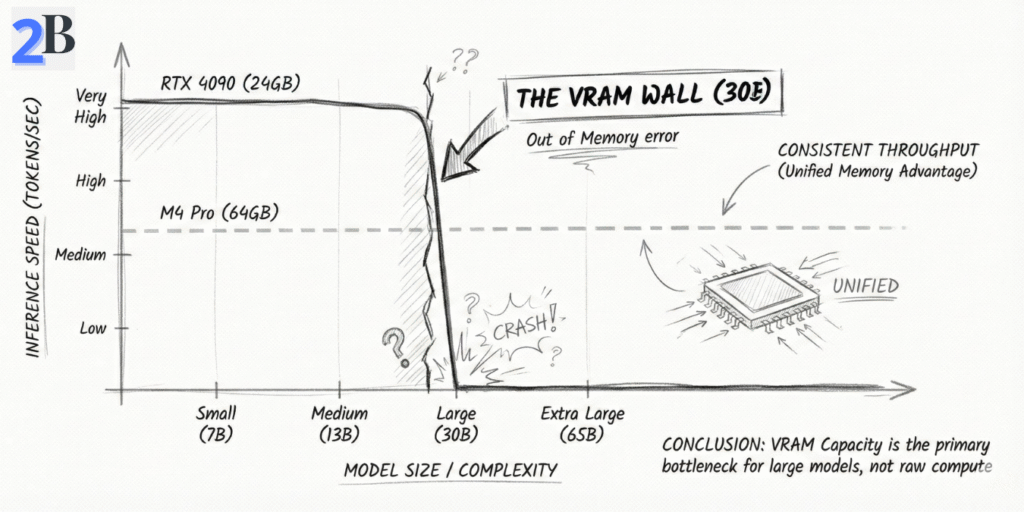
Evaluating the Mac mini M4 Pro 64GB for 30B–32B local inference is mostly a realism test: not “can it load the model?”, but “can it stay stable when context grows?”. On Apple Silicon, unified memory is shared by the OS, your apps, and the model’s working set—so what matters is generation speed + KV cache growth + headroom discipline. This section turns that into practical expectations you can actually plan around.
If your 30B choice is driven by DeepSeek-style reasoning workloads, pair this section with: DeepSeek R1 local setup + cost guide. And if your “why local” is mostly ROI, this is the supporting angle: How SLMs cut inference costs by 70%.
Here’s the key correction most buyers miss: for 30B–32B models on M4 Pro, the meaningful metric is interactive generation speed, not small-model headline numbers. In well-tuned local runs, Q4–Q5 30B-class models typically land around ~12–18 tokens/sec for generation. That’s still “real-time chat” for a large model—but it’s a very different class than 8B speeds.
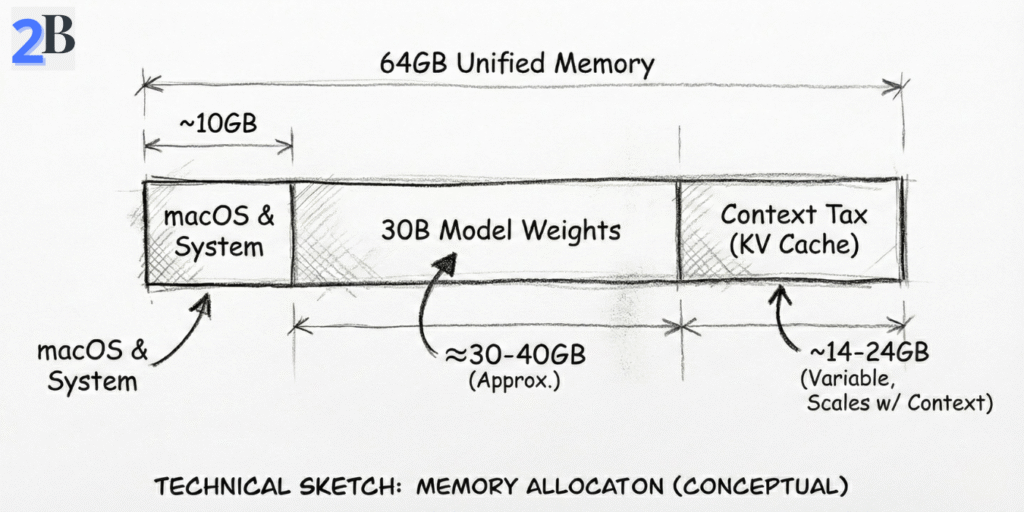
For 30B–32B, unified memory is the gating factor—not because 64GB is “small,” but because large models carry a hidden second payload: KV cache (the context tax). In practice, you should plan as if you have a working ceiling well below the full 64GB once macOS + background services + your tools are included. That’s why a setup can load “fine” and still degrade later under long sessions.
| Model (Example Class) | Quantization | Framework | Prompt Rate (tok/s) | Gen Rate (tok/s) | Memory Fit (64GB) |
|---|---|---|---|---|---|
| Qwen-class 30B | Q4 | llama.cpp (Metal) | High (workload-dependent) | ~12–16 | Yes (with headroom discipline) |
| 31B-class | Q5 | MLX | High (workload-dependent) | ~14–18 | Yes (near the practical ceiling) |
| DeepSeek-R1 class (30B+ reasoning) | Q4 | Ollama | Varies | ~12–16* | Borderline* (depends on context + concurrency) |
Bottom line: the M4 Pro 64GB is viable for 30B–32B Q4/Q5 workflows at interactive chat speed—if you treat memory as a budget and respect the context tax. Next, we’ll compare this “30B lane” against 128GB-class Macs and cloud GPU options so you can decide if you’re buying a sweet spot—or buying the edge.
Developers and researchers leveraging the Mac Mini M4 Pro for local LLM inference often leave performance on the table by running “default” settings. At the 30B–32B scale, optimization isn’t optional — it’s the difference between smooth, interactive work and slowdowns triggered by memory pressure. This section focuses on the highest-leverage tweaks that consistently improve real-world throughput and stability on Apple Silicon.
At 30B-class, your biggest gains come from using Apple-native stacks and tuning how the runtime consumes CPU/GPU resources. If you’re serious about 30B–32B on macOS, start here:
-t 14 with -ngl tuned per model/quant).For 30B–32B, the limiting factor isn’t “can it load?” — it’s “can it stay stable when context grows?” On macOS, you should plan for a practical usable ceiling (model + KV cache + runtime overhead) rather than assuming the full 64GB is available to inference. The discipline that keeps 30B smooth looks like this:
Activity Monitor > Memory Pressure as your red flag. When it goes yellow/red repeatedly, your “fast benchmark” becomes a “slow workflow.”| Optimization | Typical Practical Impact | Max Stable Model Class (Guideline) | Why It Matters at 30B |
|---|---|---|---|
| Thread + GPU layer tuning | ~10–25% throughput gain | 30B–32B (Q4/Q5) | Reduces wasted compute and improves sustained generation |
| MLX / Metal-native backend | More stable interactive throughput | 30B–32B (Q4/Q5) | Better hardware utilization on Apple Silicon paths |
| Context window discipline | Prevents swap spikes | 30B–32B | KV cache growth is the hidden memory tax |
| Staged workflows (RAG / embeddings) | Fewer “random” slowdowns | 30B–32B | Avoids stacking memory-heavy features simultaneously |
Reality check (important): on an M4 Pro 64GB, well-tuned 30B–32B Q4/Q5 workflows typically land in an interactive generation range of roughly ~12–18 tokens/sec (depending on model, quantization, batch size, and context). That may sound lower than “8B numbers,” but at 30B it’s still real-time chat speed — and the bigger win is that you can keep the whole workflow local, predictable, and private without cloud latency or per-token billing.
Next, we’ll translate this into a practical decision: when 64GB is enough, when you should consider 128GB-class Macs, and when a hybrid local + cloud architecture produces the best ROI.
If you’re paying for a Mac mini M4 Pro 64GB, you’re not buying “today’s benchmarks.” You’re buying a two-year runway for local AI — and the question is whether 64GB keeps you productive as models get heavier, contexts get longer, and agent workflows become normal (not exotic). This section is my honest outlook: where 64GB still wins, where it starts to feel tight, and how to avoid a regret purchase.
The long-term limiter on Apple Silicon at 30B+ is not CPU — it’s unified memory headroom. With today’s Q4/Q5 techniques, 30B–32B is absolutely viable on 64GB. But you’re operating close enough to the ceiling that “future-proof” depends on how your workflow evolves.
The real threat isn’t the model — it’s the “Context Tax”
On 30B-class models, you can be stable at the start of a session and still degrade later. Why? Because KV cache grows as context grows. That hidden memory bill is what turns a “works fine” setup into swap spikes and latency jumps. This is also why teams often get better ROI with smaller daily-driver models and “big model on-demand” logic.
If your goal is “always local” for cost + privacy, you should also understand the alternative strategy that often wins in real teams: use smaller local models for 80% of tasks, then route the hardest 20% elsewhere. (If you want the cost logic behind that, see: how SLMs cut inference costs.)
You don’t “future-proof” 64GB by hoping models stop growing — you do it by designing a workflow that stays efficient when they don’t. Here are the tactics that preserve ROI when the ecosystem shifts:
| Scenario (2026) | M4 Pro 64GB | Recommended Tactic |
|---|---|---|
| 30B–32B Q4/Q5 as your “power mode” | Supported (best with workflow discipline) | Keep smaller daily-driver + load 30B only when needed |
| 40B+ models as your default local tier | Likely constrained | Hybrid fallback, heavier quantization, or upgrade path |
| Very long-context workflows (persistent, high-volume) | Can become fragile over time | Summarize/phase work, control context, avoid stacking heavy features |
| Multimodal + agent stacks (routine use) | Marginal depending on tooling | Partition workloads or budget for higher-memory hardware |
Summary: the M4 Pro 64GB is a strong 30B–32B local platform in 2026 — but it is not “infinite headroom.” If you treat it as a disciplined system (context control + staged workflows + smart defaults), it stays highly productive. If you try to run 30B with maximum context, plus RAG, plus multitasking as a daily norm, you’ll feel the ceiling earlier. Next, we’ll translate this into ROI: when 64GB pays back fast, when it doesn’t, and how to structure a hybrid model that keeps costs predictable.
As local LLM deployment gains traction in cost-sensitive development and business workflows, evaluating the Mac Mini M4 Pro 64GB through a return-on-investment (ROI) lens becomes indispensable. This section dissects the real economic case for this configuration, probing whether its higher upfront cost yields faster payback, sustainable cost savings, and optimal utility compared to perpetual cloud API spend and alternative hardware options.
The primary financial driver for local LLM deployment is reducing recurring inference and data processing costs associated with cloud LLM APIs. ROI pivots on model usage volume: users running intensive coding, summarization, or document workflows can achieve hardware payback in months, not years. If you want a deeper framework for calculating local inference savings (and what usually breaks ROI assumptions), see our guide on AI inference cost reduction.
Users often debate whether the “Pro” premium yields material advantages over lower-cost Mac Mini tiers, especially for large (30B-32B) LLM workloads. The real differentiator is the 64GB unified memory ceiling: it enables stable, repeatable 30B-class local inference that lower tiers typically can’t sustain without swap thrash. But it’s important to keep performance claims honest: for 30B–32B models in Q4/Q5, the M4 Pro typically delivers interactive chat speed (roughly ~12–18 tokens/sec depending on model, context, and backend). That’s “real-time” for humans—even if it’s not the 40–80+ t/s you may see on smaller models or higher-bandwidth chips.
| Scenario | Cloud API Cost/Month* | Local M4 Pro Cost/Month | ROI/Breakeven (Months) |
|---|---|---|---|
| Heavy LLM Dev (15M output tokens) | $150 – $225+ | <$5 (electricity) | ~4–6 |
| Moderate (5M output tokens) | $50 – $75+ | <$2 | ~8–12 |
| Light/Sporadic (<1M output tokens) | $10–$15+ | <$1 | >36 |
ROI-focused buyers should match hardware tier to true workload: the Mac Mini M4 Pro 64GB is optimal for always-on, high-throughput, or privacy-critical 30B-32B LLM tasks—especially when you standardize quantization and keep long-context behavior under control. Next, we’ll examine the practical performance and memory constraints encountered at this scale, arming buyers with nuanced real-world trade-offs.
My take: yes—the M4 Pro 64GB is worth it if your day-to-day work genuinely lives in 30B–32B Q4/Q5 (coding, analysis, long-form drafting, private doc workflows) and you value predictable local performance + privacy more than chasing frontier model hype. It’s not the right buy if you need FP16, plan for 40B+ as your default, or expect multi-user serving under sustained load without building a queue/hybrid fallback.
| Your Profile | Recommendation | Why |
|---|---|---|
| Solo builder doing 30B–32B Q4/Q5 daily (coding, research, writing), privacy-sensitive | BUY | Best “interactive local” experience at this model class without token bills and with stable memory headroom. |
| Mostly <13B models, sporadic use, or you only need 30B occasionally | SKIP / DOWNGRADE | You won’t realize ROI; cheaper tiers + occasional API bursts usually win. |
| You need 40B+ soon, FP16, or very large contexts as default | DON’T BUY (FOR THIS GOAL) | 64GB becomes a ceiling; you’ll end up fighting swap/fit limits or compromising quality. |
| Small team wants shared local 30B serving (2–5 users) | HYBRID | Use local for routine work; queue requests and burst hard tasks to cloud to avoid concurrency bottlenecks. |
Yes—for quantized 30B–32B models (typically Q4/Q5) in single-user or carefully managed workflows. The practical limit is not “can it load,” but memory headroom over time (context growth + background apps) under the ~48GB usable envelope.
Because macOS + system overhead reserve a meaningful chunk of unified memory, and GPU-accelerated inference has a practical ceiling before swap and instability kick in. Treat ~48GB as your safe “model + KV cache + runtime” budget, not the full 64GB.
Context growth (KV cache) is the silent killer. A setup can feel fast at first, then degrade as sessions get longer, documents get larger, or multiple heavy apps run in parallel—pushing memory pressure into swap and causing latency spikes or instability.
All three can work. Ollama is easiest for day-to-day workflows, llama.cpp is excellent when you want fine-grained control, and MLX can be strong on Apple Silicon when you’re optimizing specifically for Metal-native paths. Pick the one you can operate consistently and monitor under real workload.
Skip it if you need FP16, expect 40B+ as your default, or require high-concurrency serving without queues/hybrid fallback. In those scenarios, you’ll hit a memory ceiling and spend more time managing constraints than doing useful work.
