Physical Address
304 North Cardinal St.
Dorchester Center, MA 02124
Physical Address
304 North Cardinal St.
Dorchester Center, MA 02124


Quick Answer: A local AI privacy audit is a repeatable way to prove no sensitive data leaves your network — using a baseline packet capture (PCAP), egress logs, and process attribution.
In this guide, you’ll build a lightweight “Evidence Pack” (PCAP + egress logs + process trace + SBOM) that holds up in vendor questionnaires and client reviews.
I’ve noticed a pattern in small teams adopting local AI: privacy is assumed, not verified. The problem is that “local” can still leak through telemetry defaults, silent updaters, plugins, and dependency callouts — and without logs, you can’t prove what happened. When a client, partner, or insurer asks “does any data leave your network?”, your answer needs evidence, not confidence.
This article gives you a lean workflow to generate that proof without enterprise tooling: (1) map data flows and your audit perimeter, (2) capture real workload traffic and tie connections back to processes, and (3) keep a simple maintenance loop so your “local means local” claim stays true as your stack evolves. If your team works with client-sensitive workflows, this companion guide makes the business case crystal clear: Stop Leaking Client Data: A Guide to Private Local AI for Real Estate & Insurance Firms.
What you’ll get by the end: a small-team “Evidence Pack” you can reuse every quarter — one PCAP from a normal workload session, egress logs (allow/deny), process attribution (which runtime tried to connect), and an SBOM snapshot for the “ghost in the runtime.”
If you’re still standardizing your local stack (which makes audits easier and reduces drift), start here: Ollama vs. LM Studio vs. LocalAI: Which Local Stack Should Your Business Standardize on in 2026?
If you’re a small team, you don’t need an enterprise GRC program to verify “local means local.” You need a repeatable audit workflow that produces evidence: what’s running, what it can reach, and proof that sensitive data doesn’t leave your network. This section is the lean setup: inventory → perimeter → data-flow map.
The Ghost in the Runtime (don’t skip this)
“Open-source” doesn’t automatically mean “offline.” Local AI stacks often pull in Python packages, Node modules, plugins, and updaters that can make silent outbound calls. Your audit must verify the runtime—not just the model.
If you’re standardizing a local stack across your business (which makes audits much easier), this overview helps: Ollama vs. LM Studio vs. LocalAI: Which Local Stack Should Your Business Standardize on in 2026?
Your goal here is to eliminate blind spots. Most “local privacy” failures happen because one sidecar service, plugin, or updater wasn’t included in scope.
For regulated client workflows, this is the compliance framing your prospects already understand (and why audit evidence matters): Stop Leaking Client Data: A Guide to Private Local AI for Real Estate & Insurance Firms.
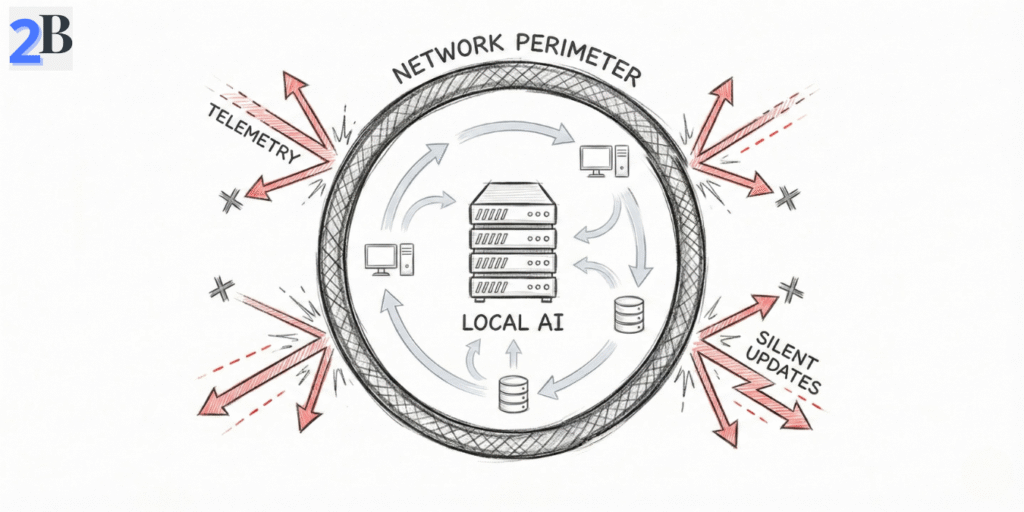
This step produces your “proof map”: what data enters, what processes touch it, and what could possibly exit. Don’t aim for perfect diagrams—aim for complete coverage in 60–90 minutes.
Pro Tip: The “Silent Update” Trap
In 2026, many “local AI” wrappers try to download updated model weights, safety filters, or plugins automatically. If your server isn’t behind a default-deny egress rule, your local privacy is a myth.
If you’re running LocalAI on Windows (common in small teams), this step is where most people lose time on visibility/driver quirks—this guide keeps it predictable: How to Set Up LocalAI on Windows via WSL2: A Driver Error-Proof Guide.
| Step | Free Tool/Method | What You Get (Audit Evidence) |
|---|---|---|
| Asset discovery | Nmap | List of hosts/services in scope (reduces blind spots) |
| Traffic capture | Wireshark / tcpdump | PCAP showing outbound attempts (or clean runs) |
| Process/socket audit | lsof / Process Explorer | Which process opened which connection |
| Config review | Manual + grep | Proof of disabled telemetry/update endpoints |
| Dependency “Ghost” check | Syft (SBOM) | Inventory of packages that could call out |
By the end of this section, you should have a complete scope, a data-flow diagram, and at least one captured workload session you can use as baseline evidence. Next, we’ll do the hard part: technical verification—proving (with logs and captures) that no data leaves your network.
Related security angle: if you’re comparing local vs cloud tradeoffs and hidden risks, this pairs well with: DeepSeek R1 vs OpenAI o1-preview for Coding Reasoning: Where Open Source Actually Wins and Cloud AI is a Money Pit: How Small Language Models (SLMs) Cut My Inference Costs by 70%.
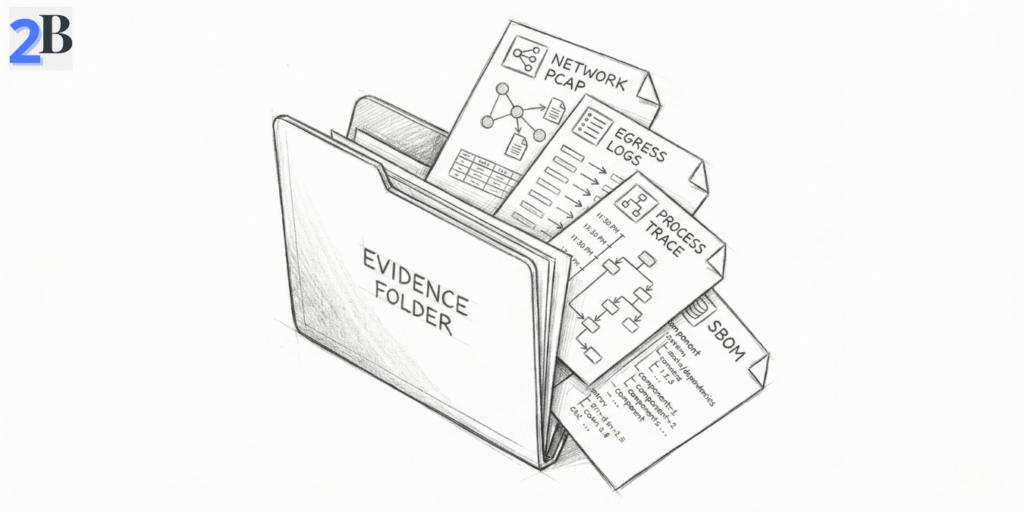
This is the “proof” section. The goal isn’t to feel safe—it’s to produce audit artifacts you can show a client, insurer, or vendor reviewer: captures, logs, and a short statement of what was tested. If your local AI stack ever “phones home,” you want to catch it here.
Deliverable: Your “Evidence Pack” (small-team friendly)
Start with network visibility. For a small team, the simplest win is: run one normal AI workflow and record exactly what connections were attempted. If your policy is “local means local,” then your baseline should be no unexpected outbound IPs (and ideally a default-deny posture with an explicit allowlist).
Pro Tip: Canary (watermark) String Test (fast exfil detection)
If you’re worried about silent egress, seed a test dataset/prompt with a unique canary string (e.g., L2B_CANARY_9F3K-2026-02-20). Then run your normal workflow while capturing traffic. If that string ever shows up in logs, outputs, DNS queries, or HTTP payloads, you’ve got an immediate red flag and a concrete artifact to investigate.
What to look for: external IPs, unexpected DNS lookups, calls to model registries, telemetry endpoints, update-check domains, or “random” CDNs. Any outbound attempt is either (a) an explicit business requirement you should document on an allowlist, or (b) a privacy finding you must remediate.
If your team runs LocalAI on Windows/WSL2, these checks are still doable—but visibility quirks can waste hours. This guide keeps the setup deterministic: How to Set Up LocalAI on Windows via WSL2: A Driver Error-Proof Guide.
Network monitoring tells you that a connection happened. Process inspection tells you who did it and why. This is how you catch the Ghost in the Runtime: a dependency, updater, or plugin making a silent outbound call while your team assumes everything is “local.”
Practical rule: every outbound attempt you find should be traceable to a named process (runtime, plugin, updater) and mapped to a decision: allow + document or block + remove. That’s what makes your audit defensible.
| Tool | Main capability | Best for |
|---|---|---|
| Wireshark / tcpdump | Packet capture + proof artifacts (PCAP) | Auditable “what left the host” evidence |
| OpenSnitch | Per-app outbound alerts + logs | Continuous monitoring + attribution |
| lsof / Process Explorer | Live file + socket visibility | Fast “which process did this?” answers |
| strace / Procmon | Detailed process activity tracing | Forensics + root cause of callouts |
| Syft (SBOM) | Dependency inventory (“Ghost in the Runtime”) | Explaining & controlling hidden callouts |
| hashdeep | Batch integrity hashes | Tracking dataset integrity over time |
When you combine network proof (PCAP + egress logs) with process attribution (lsof/strace or Procmon), you can confidently say whether your local AI stack is truly isolated. Next, we’ll turn this into an ongoing routine—a lightweight audit playbook that keeps privacy intact as your stack evolves.
Related security framing: if your “local vs cloud” decision is also about hidden risks and vendor exposure, this comparison is useful context: DeepSeek R1 vs OpenAI o1-preview for Coding Reasoning: Where Open Source Actually Wins.
A one-time audit is useful. A repeatable routine is what keeps your “no data leaves local” claim true as your stack changes (new models, new wrappers, new plugins). This is the lightweight loop I recommend for small teams—no extra headcount.
The 30-Day Privacy Loop (small team version)
The ROI isn’t just “avoid a breach.” It’s also faster security reviews, fewer client objections, and less time wasted arguing about whether your AI is safe. If you want the business framing for privacy-first local AI (especially in regulated client workflows), this is the companion guide: Stop Leaking Client Data: A Guide to Private Local AI for Real Estate & Insurance Firms.
For a small team, the ROI isn’t “compliance theater.” It’s risk control + faster sales cycles. Cisco’s privacy benchmarking consistently shows most organizations report privacy benefits outweigh costs (and many estimate a positive ROI) — even before you factor in breach impact and lost deals. For reference: Cisco’s 2025 Data Privacy Benchmark Study reports 96% say returns exceed investment, and the full report discusses ROI ranges. Also, IBM’s annual breach research puts the global average breach cost in the multi-million range (useful context when stakeholders ask “why bother?”): IBM Cost of a Data Breach 2024 highlights.
My break-even rule (small team practical)
| Approach | Direct costs / year (small team) | Skill needed | What you really get |
|---|---|---|---|
| Self-audit (open-source tools) | $0–$500 (mostly time) | 🟢 Basic / semi-technical | 🟢 Defensible proof + full control |
| Commercial governance platforms | $7,000–$15,000+ | 🟠 Vendor admin | 🟠 Convenience, but you still need trust & validation |
| Third-party audit service | $5,000–$25,000 per project | 🟢 None | 🟢 Strong snapshot proof (but needs repeating) |
If you want the compliance/business framing (especially for client-facing industries), link this right after your ROI section: Stop Leaking Client Data: A Guide to Private Local AI for Real Estate & Insurance Firms. And if the bigger decision is “local vs cloud economics,” this companion piece supports that discussion: Cloud AI is a Money Pit: How Small Language Models (SLMs) Cut My Inference Costs by 70%.
Note: This guide is educational and reflects common small-team patterns—not legal, compliance, or security advice. Your risk profile depends on your data types, industry requirements, and local setup. When in doubt, validate with your internal security owner or a qualified professional.
Use an evidence-based workflow: capture a normal workload session (PCAP via tcpdump/Wireshark), enable egress logging (firewall/OpenSnitch), and tie any outbound attempt back to a specific process (lsof/Procmon). Keep the artifacts with timestamps as your repeatable “Evidence Pack.”
The most common leak paths are telemetry defaults, silent update checks (models, safety filters, plugins), third-party connectors calling external APIs, and “ghost in the runtime” dependencies (Python/Node packages) that make outbound requests unless explicitly blocked and verified.
Not necessarily. Small teams can get defensible proof with free tooling: tcpdump/Wireshark for packet capture, OpenSnitch (or firewall logs) for outbound monitoring, and lsof/strace (or Procmon) for process attribution. Commercial tools mainly reduce operational effort at scale.
Minimum viable = one baseline workload capture (PCAP), a default-deny egress policy with logs, and process attribution showing which runtime attempted outbound connections. Store the results as an audit artifact you can reuse for vendor questionnaires.
Run a lightweight check monthly (egress log review + quick capture) and do a deeper refresh quarterly (PCAP baseline + SBOM snapshot). Re-run immediately after any change event such as new plugins, new model downloaders, runtime upgrades, or configuration changes.
