Physical Address
304 North Cardinal St.
Dorchester Center, MA 02124
Physical Address
304 North Cardinal St.
Dorchester Center, MA 02124


Six months ago, we counted eleven active AI subscriptions across our agency. ChatGPT Plus, Claude Pro, Jasper, Grammarly Premium, Midjourney, Notion AI — the list kept going. Total monthly spend: $387. The uncomfortable part wasn’t the total. It was realizing that we used maybe 30% of what we paid for, and at least three tools did almost the same thing.
That pattern is everywhere. In our experience, most solopreneurs and small agencies accumulate AI subscriptions the way people accumulate gym memberships — with good intentions and terrible follow-through. A new tool launches, you grab the free trial, the trial converts to paid, and suddenly you’re bleeding $200–$400/month on overlapping capabilities you never consciously chose.
An AI subscription cost audit is a structured review of every AI tool you pay for, mapped against your actual usage, feature overlap, and productivity impact. According to industry research, the average professional now spends $150–$240 monthly on AI subscriptions, while using less than a third of the features in each tool. For small agencies spending under $500/month on AI, a focused audit typically uncovers 30–50% in recoverable waste — not by cutting capability, but by eliminating redundancy.
We built a 3-step audit framework to fix this. After running it on our own stack, we cut $153/month and actually improved our workflow by reducing context-switching. Here’s the exact process, the overlap patterns we found, and the decision rules for what stays versus what goes.
You didn’t sign up for eleven tools because you’re careless. You did it because AI pricing is designed to make accumulation easy and auditing hard.
Every tool sits at roughly $10–$30/month. None of them feels expensive in isolation. But the real cost isn’t any single subscription — it’s the invisible stack tax. We’ve found that for every paid AI tool in a workflow, there’s roughly 15–20 minutes of weekly context-switching overhead: logging in, remembering which tool handles what, copy-pasting between interfaces, and re-entering prompts that don’t transfer.
According to Zylo’s 2026 SaaS Management Index, spending on AI-native applications jumped 108% in a single year — and two-thirds of IT leaders reported unexpected charges tied to AI features or consumption-based pricing.
The other driver is FOMO-based adoption. A competitor mentions Perplexity. A podcast recommends a new writing assistant. You sign up “just to test it,” and the test never ends. In our workflow, we found two tools we hadn’t opened in six weeks but were still paying for monthly. Sound familiar?
The fix isn’t “cancel everything and use one tool.” That oversimplification is what the all-in-one platforms sell, and it rarely works. The fix is a structured audit that separates what you actually use from what you’re paying for out of habit.
This is the exact process we ran on our own stack. It takes about 45 minutes and works whether you’re a solo founder with 3 subscriptions or a small team with 12. Grab a spreadsheet — you’ll need four columns: Tool Name, Monthly Cost, Weekly Usage (hours), and Primary Function.
Don’t rely on memory. Open your bank or credit card statement and search for every recurring charge from the last 90 days. You will find tools you forgot about. We did — a Copy.ai subscription from a trial four months earlier was still billing at $49/month.
For each tool, record:
The “primary function” column is critical. ChatGPT can generate images, write code, browse the web, and draft copy. But if you only use it for brainstorming and first-draft emails, that’s your primary function. Everything else is feature padding you’re paying for but not using.
After auditing dozens of solopreneur and small agency stacks — including our own — we’ve found the same four overlap patterns repeat constantly. If you recognize yours, you already know where to cut.
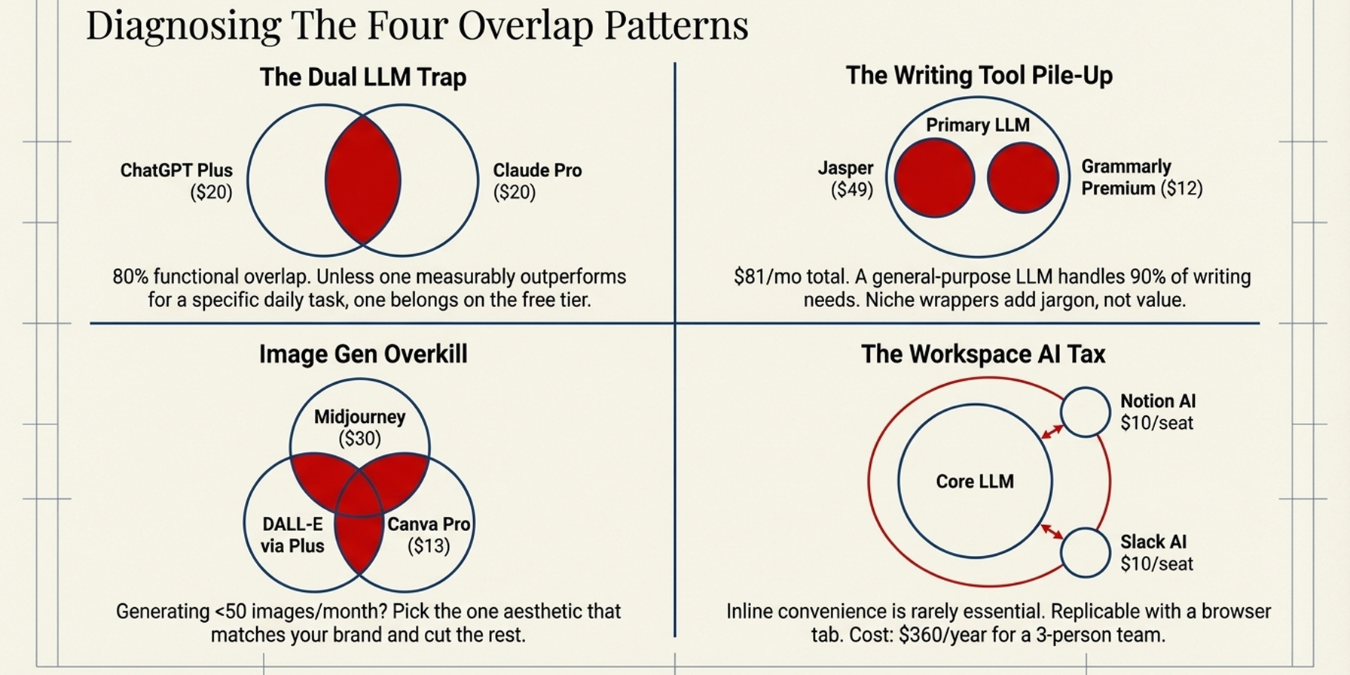
Pattern 1: The Dual LLM Trap. You’re paying for both ChatGPT Plus ($20/month) and Claude Pro ($20/month) because each “does something the other doesn’t.” In practice, the overlap is roughly 80%. Unless you have a specific, repeatable task where one model measurably outperforms the other — like Claude for long-document analysis or ChatGPT for image generation — one of these should be on the free tier.
Pattern 2: The Writing Tool Pile-Up. ChatGPT Plus + Jasper + Grammarly Premium. That’s $20 + $49 + $12 = $81/month for writing assistance. When we tested all three on the same draft, the output quality was nearly identical. Jasper added marketing jargon we’d edit out anyway. Grammarly caught two issues that Claude already flagged when asked to review for clarity. For a 1–5 person team, one general-purpose LLM handles 90% of writing needs.
Pattern 3: Image Gen Overkill. Midjourney ($10–$30/month) + ChatGPT Plus with DALL-E access + Canva Pro ($13/month) with its built-in AI image tools. If you’re generating fewer than 50 images a month — which covers most agency content needs — you don’t need three image generation subscriptions. Pick the one whose aesthetic matches your brand and cut the rest.
Pattern 4: The Workspace AI Tax. Notion AI ($10/month per member), Slack AI, Google Workspace AI add-ons — every productivity tool now bundles an AI upsell. These features are convenient but rarely essential. When we evaluated Notion AI against simply pasting the same content into our primary LLM, the results were equivalent. The inline convenience costs $10/month per person. For a 3-person team, that’s $360/year for a feature you can replicate with a browser tab.
How those workspace tools connect to your broader delivery system is a separate question — the lean agency ops stack guide covers the full picture.
For every tool in your spreadsheet, run it through these three questions in order. The first “yes” determines the action.
| Question | If Yes | Action |
|---|---|---|
| Do I use this 5+ hours/week for a task no other tool in my stack handles? | Essential — irreplaceable | KEEP |
| Do I use this, but another tool in my stack does 80%+ of the same thing? | Redundant with overlap | CUT |
| Do I use this occasionally, but the free tier would cover my actual usage? | Oversubscribed | DOWNGRADE |
The 80% rule is the key. Most people resist cutting a tool because “it does this one thing the other can’t.” That one thing needs to be worth the full subscription price on its own. If ChatGPT Plus is your primary LLM and Claude Pro is your secondary “just for long documents,” ask yourself: is long-document analysis worth $20/month? Often the answer is that the free tier of the secondary tool covers those occasional needs.
Here’s the real breakdown of what changed when we ran this framework on our own 4-person agency stack. Names and numbers, not theory.
| Tool | Before | Decision | After | Monthly Savings |
|---|---|---|---|---|
| ChatGPT Plus | $20/mo | Downgrade | Free tier | $20 |
| Claude Pro | $20/mo | Keep | $20/mo | $0 |
| Jasper | $49/mo | Cut | Cancelled | $49 |
| Grammarly Premium | $12/mo | Downgrade | Free tier | $12 |
| Midjourney | $30/mo | Keep | $30/mo | $0 |
| Copy.ai | $49/mo | Cut | Cancelled | $49 |
| Notion AI | $30/mo (3 seats) | Cut AI add-on | Notion base plan | $30 |
| Perplexity Pro | $20/mo | Downgrade | Free tier | $20 |
| Total monthly savings | $180 | |||
Pricing reflects plans available at the time of writing. AI tool pricing changes frequently — always verify current plans on each tool’s official website before making a purchasing decision.
The hardest cut was Jasper. We’d used it for over a year and built templates around it. But when we honestly compared its output to what Claude produced with a well-structured prompt, the difference didn’t justify $49/month. The templates took 30 minutes to rebuild as saved prompts in Claude. That’s a one-time cost of half an hour versus $588/year.
The internet is full of AI cost-cutting advice that sounds reasonable but backfires for small teams. Here’s what we’d skip.
“Consolidate everything into one all-in-one AI platform.” Platforms like Poe or aggregator tools promise access to multiple models under one subscription. The pitch is compelling — one fee instead of five. The reality: you get throttled access to each model, lower usage limits, and no integration with your actual workflow tools. We tried one for two weeks. The rate limits made it unusable for production work by Wednesday of each week.
“Switch to annual billing for everything.” Annual plans save 15–30% per tool, yes. But the AI landscape shifts so fast that committing to 12 months of any tool is a gamble. We’ve seen tools pivot their pricing model, deprecate features, or get meaningfully outperformed by a competitor within a single quarter. Monthly billing costs slightly more but keeps you flexible. The exception: if you’ve used a tool daily for 6+ months and it’s your clear primary, annual makes sense.
“Use free tiers for everything.” Free tiers are excellent for secondary tools you use occasionally. They’re terrible for your primary work tool. The rate limits and model downgrades on free plans introduce friction that costs you time — and time is the resource you’re actually trying to save. One paid primary LLM plus free tiers for everything else is the pattern we see working best for agencies under 5 people.
After our audit, here’s what a clean, productive AI stack looks like for a small agency or solopreneur. No feature bloat. No overlap. Every dollar tied to a specific, daily-use function.
Primary LLM — $20/month. Pick one. Claude Pro if your work is writing-heavy, analytical, or involves long documents. ChatGPT Plus if you need image generation, browsing, and the broadest feature set. Not both on paid tiers. The free tier of whichever you didn’t pick covers the 10% of tasks where that model genuinely outperforms.
Image generation — $10–$30/month. Midjourney if visual quality is critical to your client deliverables. ChatGPT‘s built-in image generation if you’re already on Plus and your image needs are moderate. One tool, not three.
If you’re building that stack from scratch, the lean AI tools guide for solopreneurs covers which tools to prioritize by role and in which order.
Everything else — free tiers or your LLM. Grammar checking, content repurposing, summarization, research — your primary LLM handles all of these when prompted correctly. The dedicated tools for each niche function add convenience, not capability. That convenience is rarely worth $10–$50/month.
Total: $30–$50/month for a solo operator. $50–$70/month for a small team that needs image generation. Compare that to the $200–$400/month stacks we routinely see, and the ROI of an audit becomes obvious.
Here’s the practical version. Block 45 minutes. Open your bank statement and a blank spreadsheet. Run through these steps without stopping.
The 90-day re-audit is non-negotiable. Subscription bloat is a recurring problem, not a one-time fix. New tools launch, free trials convert, and the accumulation pattern restarts. Quarterly audits keep it in check with minimal effort once the spreadsheet exists.
Most solopreneurs spending $100–$300/month on AI tools find 30–50% in recoverable waste, typically $50–$150 in monthly savings. The savings come from eliminating overlapping tools and downgrading paid subscriptions to free tiers for tools used fewer than 2 hours per week.
For most small agencies and solopreneurs, paying for both is unnecessary. The feature overlap between the two is roughly 80%. Pick whichever model performs better for your primary daily task, pay for that one, and use the free tier of the other for occasional needs.
For agencies and solopreneurs already paying for a general-purpose LLM like ChatGPT or Claude, dedicated writing tools rarely justify their cost. The output quality difference is minimal once you build good prompts, and the savings of $30–$50/month adds up to $360–$600 annually.
Every 90 days. The AI tool landscape changes fast enough that a quarterly review catches new bloat before it compounds. Set a recurring calendar event and keep your audit spreadsheet updated so each review takes 15–20 minutes instead of the full 45.
One paid general-purpose LLM ($20/month) plus one image generation tool if your work requires visuals ($10–$30/month). That’s a $30–$50/month baseline that covers writing, research, brainstorming, code assistance, and content creation. Everything else is optional until your specific workflow proves otherwise.
Your AI stack should be a deliberate system, not an accidental collection. Run the audit, cut the overlap, and reinvest the savings into the one or two tools that actually move your business forward. The best AI subscription cost audit isn’t the one that cuts the most — it’s the one that leaves you with a stack where every tool earns its place every week.
Last updated: March 2026
