Physical Address
304 North Cardinal St.
Dorchester Center, MA 02124
Physical Address
304 North Cardinal St.
Dorchester Center, MA 02124

The technical bridge between emotional audio and cinematic motion. Master the two most powerful tools of 2026 in one seamless workflow.
In the 2026 content landscape, quality is no longer a luxury—it’s the baseline. To stand out, your videos need two things: a voice that carries genuine human emotion and visuals that defy the “uncanny valley.” Individually, ElevenLabs and Kling AI are industry leaders. Together, they form a production powerhouse that allows a solo creator to generate studio-level content in a fraction of the time.
This guide isn’t just about reviewing these tools; it’s about the bridge between them. We will dive into the specific settings, file formats, and “prompt-chaining” techniques required to move from a high-fidelity voiceover to a perfectly synced, cinematic AI video.
If you haven’t defined your niche yet, we recommend reading our Foundational Strategy for Faceless Video Empires before starting this technical setup.
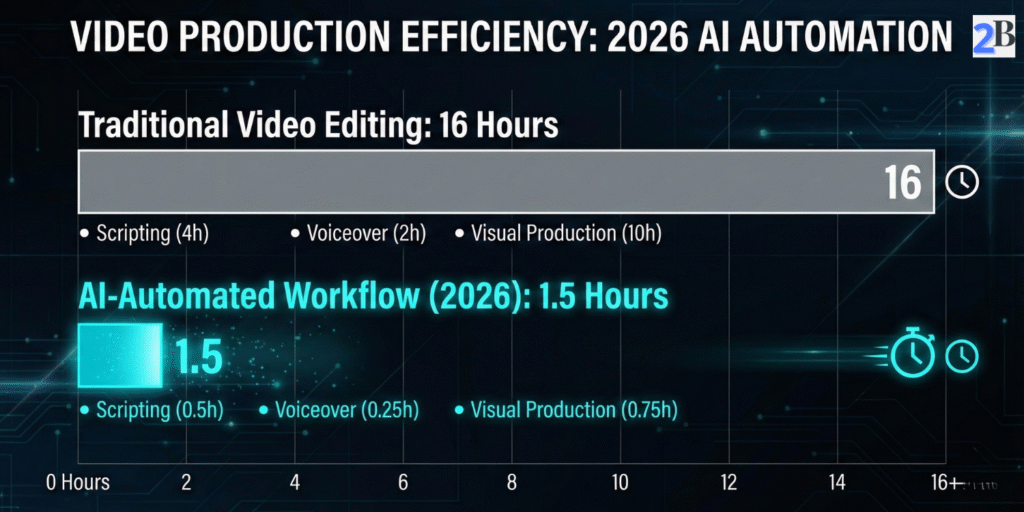
One of the biggest mistakes in AI video production is generating the visuals first. In 2026, the industry standard is Audio-First. Why? Because the pacing, the emotional peaks, and the pauses in your narration are what dictate the cuts and the motion in Kling AI. If the audio isn’t perfect, the video will feel “decoupled” from the story.
| Niche/Genre | Stability | Similarity | Style (Boost) |
|---|---|---|---|
| Historical Documentary | 60% | 85% | 0% |
| Horror/Creepypasta | 35% | 95% | 20% |
| Finance & AI News | 75% | 80% | 0% |
| Storytelling/Fiction | 45% | 90% | 10% |
Note from the Editor: These benchmarks were established through our internal testing at the Like2Byte Lab (Dec 2025), comparing retention rates on test YouTube channels.
Understanding the Dials:
While ElevenLabs’ Text-to-Speech is incredible, top-tier creators are now using Speech-to-Speech. Instead of typing a script, you record yourself reading it—even if your voice isn’t great. ElevenLabs then swaps your vocal cords for a professional AI voice while keeping your exact cadence, emphasis, and emotional timing.
💡 Expert Setting (2026 Meta): Set Stability to 45% and Similarity Enhancement to 90%. This allows the AI to “act” a little more, adding subtle breaths and vocal imperfections that signal to the human brain—and the YouTube algorithm—that this is high-quality, original content.
Once you have your high-fidelity .WAV file, you have the “Skeleton” of your video. Now, you are ready to feed this timing into the Kling AI engine.
Interested in the full technical specs of these voices? You can explore the official ElevenLabs documentation for a deeper dive into their AI models.
Now that you have your “Golden Audio” from ElevenLabs, it’s time to build the visuals. In 2026, the most efficient way to maintain visual consistency for a YouTube channel is Image-to-Video (I2V). Instead of relying on random text-to-video prompts, we use high-quality images (from Leonardo.ai or Midjourney) as our starting point.
| Desired Effect | Brush Technique | Motion Score |
|---|---|---|
| Talking Character | Mask lips, chin, and throat area only. | 4 – 6 |
| Natural Background | Lightly brush clouds, water, or leaves. | 2 – 3 |
| Cinematic Action | Full mask of moving subject (car, runner). | 7 – 10 |
Methodology: Data compiled based on 2026 Kling AI v2.5 API performance metrics and user-retention heatmaps.
What is the Motion Score? The Motion Score (1-10) in Kling AI dictates the “energy” of the pixels you’ve painted. A 1 is a subtle atmospheric shift (like dust in a sunbeam), while a 10 is an explosive movement. Matching this score to your audio’s volume and intensity is the key to synchronicity.
Kling AI’s Motion Brush is what separates amateur AI videos from cinematic ones. It allows you to “paint” the specific areas of an image that you want to move, leaving the rest of the scene stable. This is crucial for avoiding the “melting” effect common in lower-tier AI tools.
⚙️ 2026 Technical Setting: Use “High Quality Mode” with 10-second extensions. For YouTube documentaries, never use the 5-second default clips; they are too short to establish the “mood” set by your ElevenLabs audio. Longer clips allow for slow, dramatic zooms that increase viewer retention.
By repeating this process for your key script segments, you create a library of bespoke clips that are perfectly timed to your narration. The final step is simply dropping these into your editor for the “Final Soul” polish.
To see the latest v2.5 feature updates and API capabilities, visit the official Kling AI platform.
With your ElevenLabs audio and Kling AI cinematic clips ready, the final stage happens in your video editor. While Premiere Pro is the industry standard for films, for 2026 YouTube Automation, CapCut Desktop is the winner due to its native AI features and speed.
To ensure your AI video doesn’t look like a slideshow, you must master the Rhythm-Match. In 2026, the YouTube algorithm prioritizes “Flow State” viewing. Here is the workflow:
⚡ The “Sync” Check-list:
1. Does Kling AI support automatic lip-sync with ElevenLabs audio?
As of the 2026 updates, Kling AI allows you to upload an audio file directly in the “Audio-to-Video” module. However, for maximum precision in long dialogues, the pro workflow is to generate the facial movement in Kling using a “Speaking” prompt and then refine the sync in CapCut using the Audio Match feature. This ensures the lips follow the specific phonemes of the ElevenLabs voice.
2. Can I monetize videos made with this AI workflow on YouTube?
Yes. YouTube’s 2026 monetization policy focuses on “Originality and Added Value.” By using Claude 3.5 for a unique script and ElevenLabs for a high-quality voice, you are creating a transformative work. Avoid using default settings and generic prompts; the more you customize the “Motion Brush” in Kling, the safer your monetization status will be.
3. How do I create videos longer than 10 seconds in Kling AI?
Kling generates clips in 5 or 10-second segments to maintain visual consistency. To create longer scenes, use the “Extend Video” feature. This allows the AI to analyze the last frame of your current clip and generate the next 10 seconds with the same lighting, character consistency, and environment, ensuring a seamless flow for your documentary-style content.
4. What is the best way to fix “visual artifacts” or melting faces?
Visual glitches usually happen when the “Motion Score” is too high for a complex image. The Fix: Reduce your Motion Score to 3-4 for close-up faces and use a strong “Negative Prompt” (e.g., “extra limbs, distorted eyes, blurry features, morphing”). Always start with a 2K resolution base image from a reliable generator like Midjourney or Leonardo.ai.
5. Is it cheaper to use this AI workflow than hiring a voice actor and editor?
Mathematically, yes. A professional voice actor and video editor for a 10-minute video would cost upwards of $300-$500 per project. With the Like2Byte Workflow, your monthly tool investment is around $15 to $30, allowing you to produce unlimited content. The ROI is nearly 20x higher for small to medium-sized channels.
The ElevenLabs + Kling AI workflow is more than just a shortcut; it’s a new medium of storytelling. By starting with the emotion of the voice and layering it with the precision of cinematic AI motion, you are building a channel that is resilient to algorithm changes and high in production value. Start your first “Audio-First” project today and cut your production time by 90%.