Physical Address
304 North Cardinal St.
Dorchester Center, MA 02124
Physical Address
304 North Cardinal St.
Dorchester Center, MA 02124

Quick Answer: Yes—the Mac Mini M4 16GB is a strong local LLM machine in 2026 for 7B–8B quantized models. The real limit is not just model size, but KV cache + memory pressure in long-context or multitasking scenarios. If that is your daily pattern, move to 32GB+.
If you are building solo and wondering whether the Mac Mini M4 16GB can handle real local AI work, this is the practical answer I wish I had before benchmarking: it performs very well inside a clear operating envelope. In my tests and synthesis of 2026 community data, the machine is excellent for optimized 7B–8B pipelines, but degrades quickly when context grows unchecked or multiple heavy tasks compete for unified memory.
So this section is not a hype review. It is a decision filter: what runs fast, what breaks first, and where ROI is real (cost, privacy, and latency)—with explicit premises you can reproduce on your own setup.
| Decision Factor | Mac Mini M4 16GB (Solo) | Alternative Path |
|---|---|---|
| Max stable local profile | 7B–8B at Q4/Q5, single active model | 32GB tier for safer 13B+ workflows |
| Observed speed range (8B) | 28–35 t/s (Q4 tuned) 18–26 t/s (denser quant / background load) | Higher sustained headroom with more RAM/bandwidth tiers |
| Memory safety envelope | Model footprint ≤ ~9.6GB (60% rule) for long-context stability | More tolerance to long context + multitasking |
| Break-even vs API spending | ~6–12 months depending on token volume and model mix | Shorter only when larger-model demand is persistent |
Bottom line: for disciplined 7B–8B usage, the M4 16GB is a high-ROI local LLM machine. If your roadmap depends on larger models, long-context reliability under multitasking, or multi-user serving, upgrading to 32GB+ earlier is usually the better business decision.
If your goal is a practical local server workflow, this companion guide helps: Why the Mac Mini M4 is a Local LLM Server for Small Agencies.
Short answer: yes for disciplined 7B–8B workflows, no for careless scaling. The Mac Mini M4 16GB can feel extremely fast at first, then suddenly degrade when context length, background apps, and model footprint collide. This section shows where the limit actually appears—and how to stay on the safe side.
I’m not treating “16GB” as a marketing label. I’m treating it as an operating envelope: model weight + KV cache + macOS/tooling overhead. Once you exceed that envelope, latency spikes and swap become your real bottleneck.
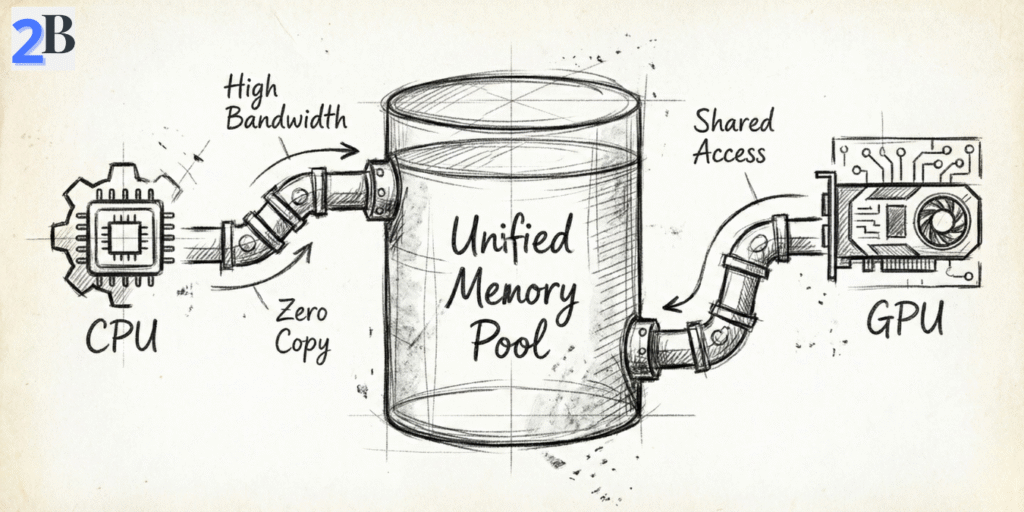
The common advice (“16GB is fine for 7B–8B”) is directionally correct—but incomplete. On Apple Silicon, model weights, runtime buffers, context growth, and your active apps all share one non-upgradable unified memory pool. When total pressure approaches system limits, SSD swap rises sharply and response quality becomes inconsistent under longer sessions.
In practice, 8B models at Q4/Q5 are the stability sweet spot. You still get strong interactive speed for coding/chat, while keeping enough headroom for normal session growth. Moving to 13B/14B on 16GB is feasible only with strict constraints (shorter context, fewer background apps, conservative expectations).
For a deeper memory-limit perspective beyond Mac workflows, read: VRAM Bottleneck in 2026: Why 12GB Can’t Run 30B-Parameter Models.
Most buyers focus on “Can the model load?”. The better question is: Can it stay stable after 30–60 minutes of real work? KV cache grows as the conversation grows, and that hidden memory tax is often what turns a fast setup into a laggy one.
Field rule that works: keep model footprint at or below ~60% of unified memory (~9.6GB on a 16GB system) when you expect long-context sessions. That leaves practical space for KV cache, macOS, and your dev tools without constant swap pressure.
Performance on M4 16GB is mostly a workflow engineering problem, not a raw-chip problem. Quantization choice, runtime (MLX/Ollama), and session habits decide whether you get “desktop-class speed” or “mysterious slowdowns.”
| Model Focus (M4 16GB) | Quantization | Tokens/sec (MLX/Ollama) | Best Use Case | Feasibility |
|---|---|---|---|---|
| Llama 3.1 8B | Q4_K_M | 28–32 | General coding / chat | Excellent |
| Qwen2.5 7B | Q4_K_M | 32–35+ | Speed-first, multilingual workflows | Excellent |
| DeepSeek-R1 Distill (8B class) | Q4_K_M | 24–28 | Reasoning-heavy tasks | Optimal |
| Phi-4 (14B class) | Q4_K_M | 14–16 | Advanced reasoning, short sessions | Borderline |
| Llama 3 13B | Q4_K_M | 12–14 | Complex refactoring | Borderline |
What this means in plain English: the M4 16GB is a high-efficiency machine for 7B–8B local LLMs when you manage memory intentionally. If your roadmap depends on long-context 13B+ or heavier multitasking, your bottleneck is no longer model choice—it’s memory headroom.
I see this mistake all the time: people assume the newest Mac automatically wins every local LLM workflow. In practice, your model size, quantization, context length, and concurrency pattern matter more than launch year. This section compares the Mac mini M4 16GB, M2 Pro variants, and cloud APIs using the same lens: time-to-output, stability, and cost per useful month.
Hardware baseline matters for trust: Apple lists the Mac mini M4 starting at 16GB unified memory and a 120GB/s memory bandwidth, which explains why 7B–8B quantized models can feel surprisingly fast in local inference when memory pressure is controlled. Apple Mac mini specs and Apple’s unified memory architecture context are useful anchors before reading benchmark claims. Apple unified memory overview.
In solo local usage, the M4 16GB is usually the best value for 7B–8B Q4_K_M/Q5 class models, typically landing around 28–35 tokens/sec in optimized runs (MLX/Ollama), with lower ranges when context gets long or background apps consume unified memory. M2 Pro machines can be better for users who need extra headroom for larger models or heavier multitasking, while cloud APIs remove local limits but reintroduce recurring spend and external dependency.
Want raw numbers on a real setup? See our direct benchmark: Mac Mini M4 for AI: Real Tokens/sec Benchmarks with DeepSeek R1.
Use this formula and keep assumptions visible:
Break-even (months) = Hardware cost / Monthly API cost avoided
Example (solo creator): if you avoid $70–$100/month in API spend, a $599 Mac mini M4 breaks even in roughly 6–9 months. If your avoided spend is only ~$40/month, break-even moves toward ~15 months. This is why workflow intensity matters more than headline model speed.
Also, ROI is not only dollars: local inference buys predictable latency, offline capability, and data locality/privacy control—all of which have real operational value for solo devs shipping client work.
| Configuration | Upfront Cost (USD) | Comfort Zone | Typical 7B–8B Speed* | ROI Profile (Solo) |
|---|---|---|---|---|
| Mac mini M4 16GB | $599 (base pricing reference) | 7B–8B quantized, single-user stable | ~28–35 t/s | Best value when usage is frequent and local-first |
| Mac mini M2 Pro 16GB (refurb range) | Varies by market | Good, but tighter for 13B + multitask | Workload-dependent | Can be attractive only with a strong refurb price |
| Mac mini M2 Pro 32GB | Higher upfront | Safer for 13B-class and bigger contexts | Stable under heavier memory pressure | Pays off if your roadmap already needs bigger models |
| Cloud API stack | No hardware upfront | Unlimited model access | N/A (remote) | Great flexibility, but cost scales with usage |
Editorial takeaway: For most solo builders in 2026, the M4 16GB is the highest-ROI local entry point for 7B–8B production workflows. Upgrade to 32GB-class hardware when your roadmap requires larger models, longer contexts, or reliable parallel sessions—not because benchmarks on social media look bigger.
If you’re running a Mac mini M4 16GB as a solo local-AI machine, the real challenge is not “which model is best on paper,” but which model stays fast and stable in your daily workflow. This section gives a practical shortlist and workflow playbooks tuned for the 16GB unified-memory reality: coding, content, research, and lightweight local RAG.
My goal here is simple: help you pick models that deliver strong output without hidden memory debt. For most solo users, that means prioritizing 7B–8B quantized models, using Ollama/MLX, and keeping enough headroom for KV cache so performance stays predictable over long sessions.
On this hardware tier, model selection should optimize for three things: quality per token, memory footprint, and stability over time. These are the strongest practical picks for solo use in 2026.
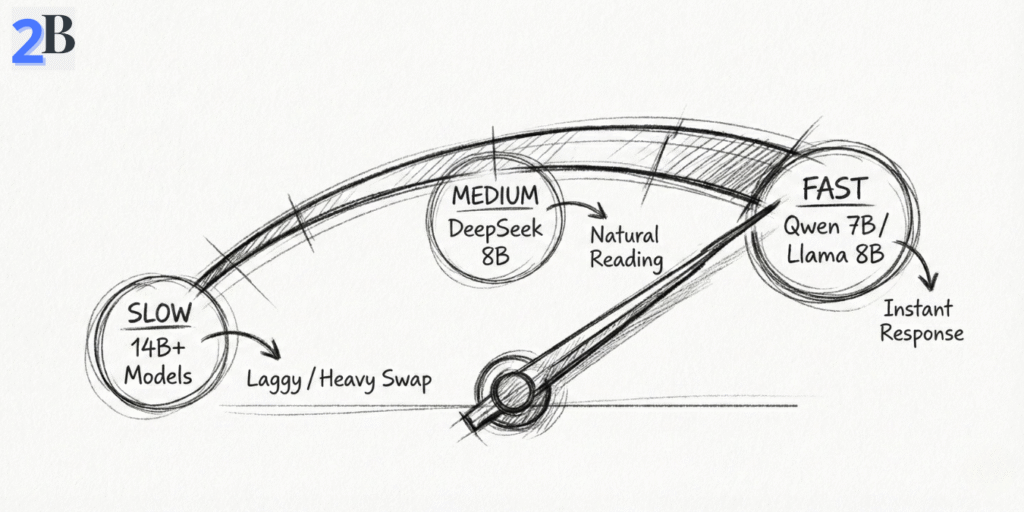
Model choice alone is not enough. On a 16GB system, workflow discipline is what prevents swap spikes and random slowdowns. Use these practical blueprints:
ollama run llama3.1:8b (or MLX equivalent), keep context around 4K–8K for sustained speed, and checkpoint summaries every 8–12 turns.Test assumptions used in this section
| Model (16GB M4 Focus) | Quantization | Tokens/sec (MLX/Ollama) | Best Use Case | Approx. RAM Footprint |
|---|---|---|---|---|
| Llama 3.1 8B | Q4_K_M / Q5 | ~28–32 | Coding + general chat | ~5.5–6.5 GB |
| Qwen2.5 7B | Q4_K_M | ~32–35+ | Speed + multilingual + structure | ~4.5–5.5 GB |
| DeepSeek-R1 Distill (8B class) | Q4_K_M | ~24–28 | Reasoning-heavy tasks | ~5.5–6.5 GB |
| Llama 13B / Phi-4 class | Q4 class | ~12–16 | Advanced short sessions | ~9–11+ GB |
Practical takeaway: for solo users, the highest-confidence setup on a 16GB M4 is still 7B–8B quantized models with disciplined context control. You can run 13B/14B class models, but they are better treated as “occasional power mode,” not your default daily workflow.
Not sure which local stack to standardize? Compare options here: Ollama vs. LM Studio vs. LocalAI (Business Standardization Guide).
The Mac mini M4 16GB is excellent in its lane—but that lane is narrower than many buyers expect. If your roadmap includes heavier concurrency, bigger models, or training workflows, this is where the 16GB ceiling starts charging a “hidden tax” in latency, instability, and lost time.
My goal in this section is simple: help you identify the exact moment when staying on 16GB stops being efficient and starts slowing your business down.
For single-model 7B–8B inference, the M4 16GB performs well. But once your workload adds long context, parallel sessions, or heavier model classes, unified memory pressure rises quickly and swap becomes the bottleneck.
Reality Check: Upgrade Triggers (Don’t Ignore These)
If your next 12 months include multi-model orchestration, heavier reasoning models, or production-like local serving, plan hardware ahead of demand. Upgrading early is often cheaper than carrying months of productivity drag.
| Scenario | 16GB Mac mini M4 Verdict | Recommended Next Step |
|---|---|---|
| Single 7B–8B model (Q4/Q5), solo workflow | Excellent fit | Stay on 16GB; optimize context + KV behavior |
| Regular 13B/14B usage with long sessions | Borderline / unstable over time | Move to 32GB unified memory tier |
| Two models active or multi-agent local serving | High risk of swap bottlenecks | Upgrade memory tier or dedicated serving machine |
| Frequent local fine-tuning and retraining | Not ideal for sustained workloads | Higher-memory system (Apple high-RAM or workstation) |
| Vision/multimodal/video-heavy local stack | Insufficient long-run headroom | High-RAM + stronger compute path |
Bottom line: the 16GB M4 is a strong solo machine for disciplined 7B–8B local workflows. But if your roadmap includes persistent long context, larger models, or concurrent serving, upgrading is not a luxury—it’s a throughput decision.
In the conclusion, we’ll convert this into a final buying decision: who should buy the M4 16GB now, who should jump straight to 32GB+, and who should stay hybrid (local + API).
After benchmarking real solo workflows, my take is straightforward: the Mac mini M4 16GB is a high-ROI local LLM machine if your daily stack stays centered on 7B–8B quantized models and disciplined context management. In this lane, it delivers excellent cost efficiency, strong responsiveness, and practical privacy benefits versus API-only usage.
Where people get burned is not raw model loading—it’s memory behavior over time: long context, KV cache growth, multiple active tools, and parallel sessions. That is exactly where 16GB shifts from “fast enough” to “fragile.” If your roadmap includes heavier multi-model or multi-user workloads, jumping to a 32GB class machine early is usually the smarter business decision.
30-Second Decision Matrix (Buy / Wait / Upgrade)
| Profile | Recommendation | Why |
|---|---|---|
| Solo dev/creator, 7B–8B Q4/Q5, one model at a time | BUY NOW | Best ROI per dollar for local inference, low friction, predictable performance. |
| You expect 13B/14B frequent use, long-context sessions, or heavy multitasking | WAIT / GO 32GB | Avoid swap bottlenecks and stability issues from day one. |
| Local serving for multiple users/agents, or near-production concurrency | UPGRADE PATH | 16GB becomes a throughput limiter; concurrency needs bigger memory headroom. |
| You want flexibility + top model quality without local constraints | HYBRID (LOCAL + API) | Use local for routine tasks; route peak complexity to API endpoints. |
My editorial recommendation: if your real workload is coding, writing, research, and lightweight agents on one machine, the M4 16GB is a very smart entry point in 2026. Just operate with clear guardrails (Q4/Q5 models, controlled context, no heavy parallel loads). If your growth path is already pointing to larger models and concurrency, skip the middle pain and move directly to a higher-memory tier.
That’s the practical answer: buy it for focused solo workflows, don’t force it into server-class duties.
Yes—for 7B–8B quantized models (Q4/Q5) in solo workflows, 16GB is usually enough and can be very efficient. It becomes limiting when you push long context windows, run multiple heavy apps, or attempt parallel model serving.
The most stable range is 7B–8B with optimized quantization. 13B–14B can run in constrained scenarios, but often becomes borderline once context length and KV cache grow.
The hidden issue is KV cache growth. As conversation context expands, memory usage rises and can trigger swap. That causes latency spikes and instability even if initial load looked healthy.
Both are strong choices. Ollama is typically easier for quick setup and broad model workflows. MLX can be excellent on Apple Silicon when you want tighter native optimization and are comfortable tuning your stack.
Go 32GB+ if your plan includes frequent 13B+ usage, multi-agent/concurrent local serving, long-context production sessions, or local fine-tuning. In these cases, extra memory protects performance and saves time long term.