Physical Address
304 North Cardinal St.
Dorchester Center, MA 02124
Physical Address
304 North Cardinal St.
Dorchester Center, MA 02124


If you’re reading this, you probably already felt the pain: a coding session is flowing, the architecture is clear in your head, and then usage limits hit right in the middle of a critical loop. For engineering teams, this is not just a UX annoyance — it creates delivery drag, context rebuild time, and hidden cost that rarely appears in the subscription price.
In this guide, I’ll break down Claude Max limits the way teams actually experience them in 2026: with concrete scenarios, planning ranges, and ROI math you can adapt to your own workload. The goal is simple: help you decide when Max is a genuine throughput upgrade, when Pro is still enough, and when a hybrid setup protects your margin better.
Quick Answer (2026)
Claude Max is worth it only when interruptions are recurring and expensive. If limit friction is delaying real delivery, selective Max seats usually outperform “Max for everyone.” If your workload is mixed (interactive coding + batch jobs), a hybrid subscription+API setup often wins on ROI. Below, I’ll show the break-even logic and real workload scenarios so you can choose with numbers, not guesswork.
For heavy coding, the question is not “how many tokens on paper,” but “how long can I stay in flow before limits interrupt delivery.” In this section, we use a practical planning lens for engineering teams: interactive coding sessions (chat/terminal), multi-file context, and deadline-driven iteration.
Assumption note (2026): Values below are planning ranges, not fixed guarantees. Effective throughput varies by model, prompt size, concurrency, tool usage (web/app/API/CLI), and temporary platform guardrails.
In practice, teams should separate two constraints: context capacity and interaction throughput. Even with large context windows, heavy coding can still slow down when session-level controls trigger resets or cooldown behavior. For planning, treat UI usage as session-governed and API usage as rate/token-governed.
If you are running a solo operation, check our Claude Pro vs Max ROI for Solopreneurs to see how these limits scale for one-person businesses.
Editorial position: for heavy coding, most planning mistakes happen when teams assume “large context = no interruptions.” It doesn’t. Throughput behavior still decides real productivity.
When coding sessions run long, developers often face two practical issues: (1) rolling usage windows that can pause momentum, and (2) context compaction/summarization effects that may reduce fine-grained continuity in multi-step refactors. This is where teams lose time rebuilding context manually.
A robust mitigation pattern is simple: split work into bounded modules, keep state snapshots (decisions, diffs, pending tasks), and rehydrate context intentionally at checkpoints instead of relying on one giant thread.
| Mode | Planning Range (2026) | What Actually Limits You | Heavy Coding Impact | Recommended Control |
|---|---|---|---|---|
| Pro (interactive) | ~35–60 msg-equivalents / 5h | Session window + workload shape | Frequent risk of mid-flow interruption in intense weeks | Shorter cycles, stricter task modularization |
| Max 5x (interactive) | Materially higher than Pro | Still session-governed, but with more headroom | Better continuity for daily terminal/chat-heavy coding | Reserve for chronic heavy contributors |
| Max 20x (interactive) | Highest subscription headroom | Diminishing ROI if load is not consistently extreme | Best for recurring peak operations | Use selectively, validate monthly utilization |
| API (Sonnet/Opus) | Token/rate driven (implementation-dependent) | Prompt design, batching, retry patterns, quotas | High scalability when pipeline is engineered well | Chunking + caching + async orchestration |
Bottom line: in 2026, “Can Claude Max handle heavy coding?” depends less on headline specs and more on workflow design under pressure. If your team depends on uninterrupted long sessions, model limits as operating constraints and design around them from day one.
Limits are not just a UX annoyance—they are an operations cost. In this section, we model what happens when heavy coding sessions are interrupted and how that translates into delivery risk, rework, and margin pressure.
Assumption Box (How to read these numbers)
The ranges below are planning assumptions for small teams running coding-heavy workflows (multi-file edits, debugging loops, review iterations). Your real values can vary by prompt shape, model choice, team discipline, and API offloading strategy.
For teams of 2–10 developers, the cost of interruption often triggers the need for a Claude Team workspace to manage shared context and seat governance.
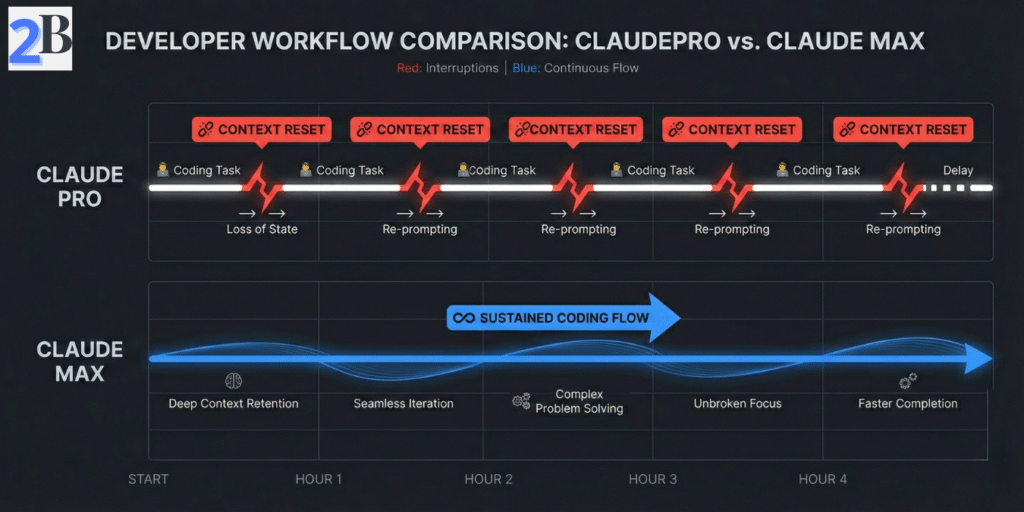
When a session hits limits mid-flow, the cost is rarely “just waiting.” The bigger loss is context rebuild: reloading files, re-stating intent, and re-validating previous reasoning. For most technical teams, that creates measurable weekly drag.
Quick cost formula (monthly)
Monthly Loss ($) = (Resets/week × Minutes lost/reset × 4.33 ÷ 60) × Hourly value
Example: 8 resets/week × 10 min × 4.33 ÷ 60 = 5.77 h/month. At $70/h, that is $404/month in hidden interruption cost.
Repeated cap hits can also increase delivery volatility: missed handoff windows, fragmented code review flow, and more “safe but slower” manual fallback. In practice, teams feel this as schedule slippage and lower throughput confidence—not just model frustration.
| Operational Signal | Lower-Friction Setup (Hybrid / Better Orchestration) | Higher-Friction Setup (Frequent Cap Hits) | Why It Matters |
|---|---|---|---|
| Reset events (per heavy user/month) | ~8–25 | ~25–70 | Higher reset count compounds context rebuild cost |
| Estimated weekly downtime | ~0.5–1.5 h | ~2–6 h | Direct pressure on sprint commitments |
| Rework probability after interruption | Lower | Higher | Interrupted reasoning increases validation cycles |
| Mitigation overhead required | Periodic | Frequent | More process work just to keep delivery stable |
Editorial position: once interruption cost becomes recurring, this is no longer a “model preference” issue—it is a workflow economics issue. Most teams improve margins by combining subscription seats for interactive work with API offloading for batch/background tasks.
External References
For implementation details, review Anthropic docs on API rate limits and prompt caching. These are core levers for reducing reset-driven cost in heavy coding workflows.
If your team is hitting limits during large codebase work, the goal is not “more prompts.” The goal is better context packaging + better routing. This section shows the operating model we use to keep throughput stable under heavy coding load.
Working Premise (2026)
For multi-module repositories, teams usually get better results by splitting work into interactive loops (UI/terminal) and batch pipelines (API). This reduces context resets and lowers token waste over long coding cycles.
For large repositories, a single mega-thread is fragile. A better pattern is to structure context in layers and send only what the current task needs.
Practical gain: teams commonly report lower context rebuild overhead and more stable multi-turn edits when module briefs are maintained each sprint.

Use interactive sessions for reasoning and decisions; use API jobs for repeatable heavy operations. This avoids forcing one channel to do everything.
Quick implementation sequence (first 14 days)
| Workflow Tactic | Best Use Case | Expected Operational Benefit (Range) | Trade-Off / Setup Cost |
|---|---|---|---|
| Code Chunking + Module Summaries | Large repos with frequent handoffs | Lower context rebuild time (~10–35%) | Needs maintenance discipline per sprint |
| Vector Retrieval (Docs + Code) | Multi-file reasoning and long-lived projects | Lower token waste on irrelevant context (~15–40%) | Infra + embedding/index refresh overhead |
| API Parallelization | Repeatable heavy jobs (tests, transforms, docs) | Higher throughput and fewer interactive bottlenecks (~20–60%) | Requires monitoring, retry logic, cost controls |
Editorial take: the winning pattern is rarely “one tool, one lane.” For heavy coding teams, the durable setup is interactive reasoning + API production pipeline + lightweight retrieval layer.
To further reduce dependency on expensive cloud limits, many agencies are offloading local testing to a Mac Mini M4 AI Server, preserving their Claude Max allowance for complex architecture tasks.
This section turns plan selection into a financial decision model. Instead of debating features in isolation, we estimate when Claude Max creates net gain versus when a hybrid setup (subscription + API) protects margin better for heavy coding teams.
Assumptions Used in This Section
Numbers below are scenario-based ranges for planning (not universal absolutes). Real outcomes vary by prompt size, coding style, concurrency, reset frequency, and how much workload is routed to API pipelines.
Use this simple rule to decide if upgrading a seat is financially justified:
Break-even hours per month
Break-even hours = Plan Delta / Effective Hourly Value
Fast examples:
Scenario: team of 5, two heavy contributors (lead + reviewer), three moderate users, frequent multi-file PR cycles, and occasional deadline weeks.
| Setup | Monthly Plan Cost | Operational Pattern | Typical Financial Outcome |
|---|---|---|---|
| Pro for all | $100 | Lowest fixed cost, but higher cap-friction risk in peak weeks | Good only if interruptions rarely delay delivery |
| Hybrid (3 Pro + 2 Max 5x) | $260 | Heavy users protected; moderate users stay lean | Most common sweet spot when only some roles are chronic heavy users |
| Max 5x for all | $500 | Highest continuity, highest fixed overhead | Pays only when most seats are consistently heavy every week |
Worked example: suppose each heavy user loses ~2.5 hours/month from interruptions on Pro. If effective hourly value is $70, recovered value per heavy seat is 2.5 × $70 = $175/month. Since the upgrade delta to Max 5x is ~$80, net gain is about $95/month per heavy seat before secondary quality/speed effects.
This is why many engineering teams do not start with “Max for everyone.” They start with role-based upgrades and expand only if telemetry shows recurring bottlenecks across additional seats.
At team level, the best choice is usually not “which model is best in isolation,” but which stack preserves delivery continuity at the lowest total cost of execution.
| Decision Factor | Claude Max (Subscription) | API-First Alternatives | Practical Interpretation |
|---|---|---|---|
| Fixed Monthly Predictability | High | Medium (usage-variable) | Subscription helps planning; API needs tighter budget controls |
| Heavy Interactive Coding Loops | Strong | Depends on orchestration | Max helps when long interactive sessions are core to delivery |
| Batch/Background Jobs | Less efficient channel | Strong | API usually wins for queued repetitive workloads |
| Peak-Week Resilience | Good (especially selective seat upgrades) | Good if infra is mature | Hybrid often outperforms “single-plan does everything” |
Bottom Line
For most engineering teams, the highest ROI pattern is not “Max for all seats.” It is usually Pro baseline + selective Max for chronic heavy users + API for batch pipelines, validated monthly with interruption and cycle-time telemetry.
In practical terms, many teams model Claude Max with a rolling-window mindset: capacity is high, but not infinite during long debugging loops. Real throughput depends on message size, attached context, tool usage frequency, and concurrency. For planning, treat limits as a range and monitor interruption frequency weekly.
Usually yes—especially when you use terminal/CLI flows intensively. Terminal-driven sessions can consume allowance faster because each step may require fresh context reads and follow-up actions. If interruptions happen repeatedly and start delaying delivery, Max (often 5x first) is typically the safer operational tier.
For many teams, the best setup is hybrid: subscription for interactive coding/review sessions and API for background or batch operations. Subscription improves day-to-day flow; API gives tighter control for automation, queues, and cost governance. If you force one channel to do both jobs, you often overpay.
Use a simple break-even rule: Upgrade if monthly value lost from interruptions > plan delta. A practical version is:
Break-even hours = (Plan Delta) / (Effective Hourly Value).
Example: if delta is $80 and your effective hourly value is $50, you only need to recover 1.6 hours/month for the upgrade to pay for itself.
The most common mistake is buying peak capacity for everyone. Most small teams get better ROI from Team workspace for coordination plus selective Max seats for chronic heavy users. Measure who actually hits limits repeatedly, then upgrade by role—not by default.