Physical Address
304 North Cardinal St.
Dorchester Center, MA 02124
Physical Address
304 North Cardinal St.
Dorchester Center, MA 02124


In this guide, I’m not trying to repeat vendor landing pages—I’m translating plan tiers into real operating decisions for small dev teams. I’m using a practical baseline (teams of 2–10 developers, recurring coding workflows, mixed collaboration intensity, and monthly budget pressure), then stress-testing where each plan tends to break or pay off. The numbers here are scenario-based ranges, not universal constants, so you should adapt the assumptions to your own workload mix, delivery deadlines, and effective hourly value before choosing Pro, Team, or selective Max seats.
Quick Decision Snapshot (2026)
If you only need the short answer, use this. If you want the cost break-even math, role-by-role seat mix, and the failure points that change the decision, see the case scenarios below.
↓ Next section: where this rule fails (and where teams overpay).
Choosing the right Claude plan is more than a subscription decision—it is an operating model decision that directly affects delivery speed, interruption risk, and cost control. In this guide, we map Claude tiers to real dev-team behavior in 2026 (2–10 developers), using scenario-based ranges instead of fixed absolute limits.
Methodology Note (2026)
This article uses scenario-based ranges, not universal fixed limits. Real usage can vary by model selection, request complexity, session length, traffic load, and policy updates.
To keep comparisons practical, we assume a small engineering team (2–10 devs), mixed IDE/CLI usage, recurring code-review and refactor tasks, and standard business-week delivery pressure. Treat the numbers below as decision ranges, then calibrate to your team’s actual telemetry.
If you’re evaluating plans as a one-person operation, check our Claude Pro vs Max ROI comparison for solopreneurs before choosing a team setup.
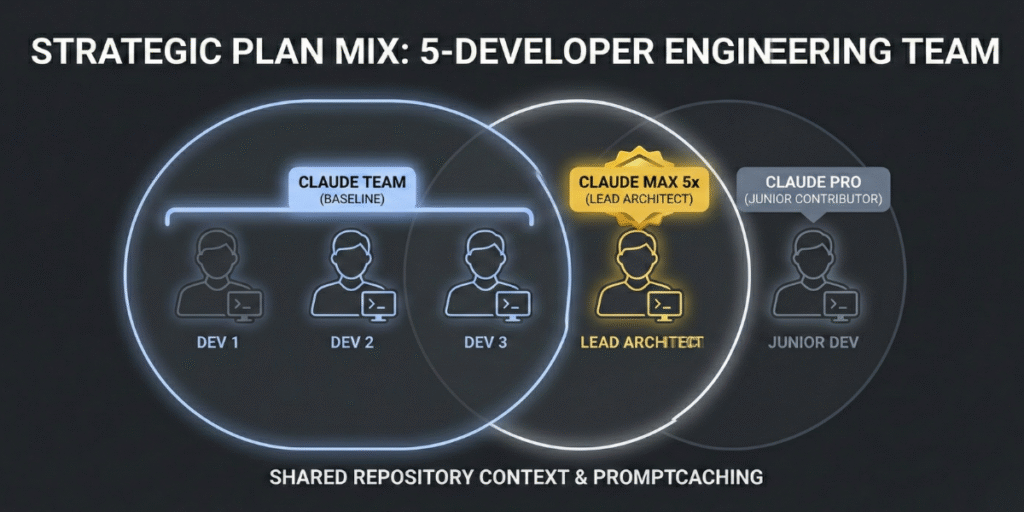
Claude tiers are less about “more messages” and more about workflow stability under pressure. As teams move from occasional prompting to daily repo-level work, the wrong tier usually shows up as delivery friction.
Quick read: Pro = cost-efficient baseline, Max = throughput insurance for heavy users, Team = coordination/governance layer for multi-seat operations.
Claude Pro
$20/user/month baseline.
Best for moderate daily intensity. Teams often model a planning range of ~35–60 message-equivalents per 5h in coding-heavy sessions.
Claude Max
$100 (5x) or $200 (20x) per user/month.
5x is usually the first upgrade when Pro interruptions affect deadlines. 20x is generally for recurring extreme weeks.
Claude Team
Typically ~$25/user annual or ~$30 monthly (billing dependent).
Adds admin, billing, and workspace controls. ROI usually appears when coordination overhead starts (often 3+ active contributors).
| Tier | Best Fit | Primary Value | Common Risk If Misused |
|---|---|---|---|
| Pro | Solo or light/moderate contributors | Lowest baseline cost | Interruptions under sustained heavy coding |
| Max 5x/20x | Power users with repeated cap friction | Throughput continuity | Overpaying if workload is only occasional/spiky |
| Team | 2–10 contributors needing coordination | Governance + collaboration operations | Paying for coordination features before they are needed |
Editorial position: For 2–10 dev teams, the real choice is not sticker price — it is whether your tier maintains delivery continuity when workload spikes.
Unlike individual Pro/Max subscriptions, Team is designed for coordinated delivery. For small engineering groups, the value is less about “more messages” and more about operational control: seat governance, centralized billing, shared workspace policies, and smoother onboarding/offboarding across active projects.
Reference: official plan details and seat structure are documented on Claude pricing and Team plan documentation.
| Plan | Indicative Cost (Per User/Month) | Usage Model (Planning View) | Key Dev Characteristics | Best Fit |
|---|---|---|---|---|
| Claude Pro | $20 monthly (or lower with annual discount) | Individual seat limits; often modeled around ~35–60 message-equivalent interactions per 5h in coding-heavy sessions | Strong solo value, low entry cost | Individuals / light contributors |
| Claude Max (5x / 20x) | $100 / $200 monthly | Higher per-seat capacity for power usage; typically assigned selectively, not team-wide by default | Best for recurrent heavy users and interruption-sensitive roles | Power users / lead implementers |
| Claude Team (Standard / Premium seats) | Commonly ~$25 monthly standard seat (with annual discounts available); premium seats priced higher | Workspace-managed seats with team governance; capacity profile varies by seat type and plan configuration | Admin controls, collaboration governance, identity options | 2–10 dev teams with shared delivery cadence |
Scenario note: values above are planning ranges for a 2–10 dev team under mixed chat + CLI usage. Actual throughput can vary by model selection, request complexity, and platform policy changes.
The practical takeaway: for small teams, plan quality is measured by delivery continuity under load, not by headline price alone. Next, we model where usage limits create real throughput drag—and when selective upgrades outperform blanket upgrades.
Headline multipliers like “5x” and “20x” are directionally useful, but technical leaders need a workload translation layer: how often limits interrupt delivery, how much context must be rebuilt, and when seat upgrades produce measurable cycle-time gains.
Reference: Claude usage windows and reset behavior are documented in Anthropic support (usage windows and limits). The ranges below are planning assumptions for 2–10 dev teams in coding-heavy weeks.
In practice, constraints show up as rolling-window usage pressure, not as a single “hard daily number.” For planning and ROI modeling, teams typically track three pressure points:
Operationally, this means teams should avoid fixed universal claims like “X prompts/day.” A better approach is scenario ranges: for Pro seats under sustained coding intensity, many teams model roughly 120–260 meaningful interactions/day; for power seats, substantially higher. The key is not absolute volume—it is how often interruptions break active delivery.
To reduce interruption-driven cycle loss, high-performing teams use simple control rules:
| Seat Type | Planning Capacity (5h Window) | Recommended Role Pattern | Indicative Cost/User |
|---|---|---|---|
| Pro | ~35–60 interaction-equivalent (coding-heavy assumption) | Standard contributor, moderate intensity | $20/month baseline |
| Max 5x | ~5x Pro relative capacity (scenario-modeled) | Lead implementer, review bottleneck owner, power user | $100/month |
| Team Standard Seat | Varies by workspace configuration and usage profile | Collaborative team workflows needing governance/admin controls | ~$25 (annual) / ~${30} monthly typical |
Ranges above are designed for planning and comparison, not as fixed platform guarantees. Real outcomes vary by model/runtime behavior, request shape, and policy updates.
Telemetry note for team leads: use workspace-level usage visibility to identify which roles repeatedly hit cap-related slowdowns (for example, reviewer/debugger seats). This is the operational signal behind selective Max allocation instead of blanket upgrades.
The core ROI signal is simple: if interruption-heavy days become frequent, selective seat upgrades usually outperform generic process optimization alone.
For small dev teams, model quality is only half the equation. The other half is workflow continuity: how fast people can hand off work, recover context, and ship without tool friction. This is where team-level controls and CLI-centered workflows often decide ROI more than raw model capability.
Editorial position: teams usually over-focus on “which model is smartest” and under-focus on “which setup creates fewer handoff failures per sprint.” In practice, handoff reliability is what protects delivery margins.
Claude Code tends to create the biggest gains when teams run repo-heavy routines daily (review loops, refactors, bug triage, release prep). The value is less “magic AI” and more reduced context-switch cost inside terminal/IDE workflows.
For terminal-first workflows with lower latency and tighter privacy control, see our guide on using the Mac Mini M4 as a local AI server.
Practical caveat: exact integration depth and collaboration behavior can vary by plan, workspace configuration, and release cycle. Treat this section as an operational pattern guide, then validate against your live workspace setup.
Beyond model access, Team-oriented workspaces matter because they reduce operational entropy: who can access what, how seats are governed, and how usage is monitored over time. For 2–10 dev teams, these controls often have more ROI impact than raw model upgrades—especially when handoffs and limit management are part of daily delivery.
| Capability | Individual Plans (Pro/Max) | Team Workspace | Why It Matters in Practice |
|---|---|---|---|
| Claude Code Access | Available per eligible user/plan | Available across eligible team seats | More consistent repo-assisted workflow adoption |
| Identity & Access Governance | Limited workspace-level control | Stronger org-level controls (plan/config dependent) | Cleaner onboarding, lower access-risk overhead |
| Billing & Usage Oversight | Primarily per-user visibility | Central admin visibility and seat governance | Better cost-to-output management for small teams |
| Project/Knowledge Reuse | Mostly user-scoped setup patterns | Better team-level reuse via shared workspace/project practices | Less duplicated setup effort across contributors |
| Cross-User Workflow Continuity | Mostly user-specific history | Improved team process continuity via shared workspace practices | Less restart friction during handoffs |
| Support Path | Standard support path (varies by subscription) | Can include enhanced pathways depending on plan/contract | Faster issue resolution in high-pressure releases |
Operator note: for teams choosing selective Max seats, admin-level usage telemetry is the practical trigger. Upgrade the roles that repeatedly hit cap-related slowdowns; keep everyone else on the lower-cost baseline.
For small dev teams, Claude plan selection is not a “feature preference” decision—it is an operating-margin decision. In this section, we model realistic monthly cost bands for teams of 2, 5, and 10 developers, then map when Pro, Team, or selective Max seats create better delivery economics.
Assumption Box (Scope of This Model)
This model assumes a 2–10 dev team, 20–22 working days/month, mixed coding/review/debug workflows, and no enterprise procurement discounts. Numbers are presented as planning ranges (not universal constants), because real limits vary by model mix, prompt size, peak-hour load, and workflow design.
Subscription cost is simple. ROI is not. The real question is whether usage limits are creating delivery friction (rework, context rebuild, delayed handoffs). For most teams, Team is a coordination/governance upgrade, while Max is a targeted throughput upgrade for heavy roles.
Break-even Formula (Operational)
Upgrade pays if:
Monthly value recovered from fewer interruptions > Monthly plan delta
Practical version: Break-even hours = Plan Delta ÷ Effective Hourly Value
Quick example: 5-dev team moving from Pro ($100) to Team ($125) has a $25 delta. If the team’s blended effective value is $60/hour, break-even is 0.42h/month (about 25 minutes) recovered from fewer blockers. If you recover more than that, the upgrade is financially positive.
| Team Size | Cheapest Baseline | Most Efficient Upgrade Pattern | Upgrade Trigger |
|---|---|---|---|
| 2 devs | Pro ($40) | Team ($50) or 1 selective Max seat | One dev repeatedly hits limits and blocks handoffs |
| 5 devs | Pro ($100) | Team ($125) + 1–2 selective Max seats | Lead/reviewer loses ~2–4+ hrs/month from cap friction |
| 10 devs | Pro ($200) | Team ($250) + role-based Max seats | Sprint flow depends on uninterrupted heavy contributors |
Editorial position: avoid “Max for everyone” before proving role-level bottlenecks. In most 2–10 dev teams, the cleaner margin comes from Team for coordination + selective Max for chronic heavy users.
Claude Team stands out by combining a high context window and integrated code assistant, plus SSO and centralized billing, at minimal uplift. Max is the only viable competitor for ultra-heavy, code-centric users who need session caps >200/day per dev — but incurs steep overhead for small teams unless those needs are proven.
For most 2–10 person teams, yes. Team workspace governance and better workflow continuity usually reduce handoff friction and delivery delays. Pro-only setups can be cheaper on paper, but they often become expensive when one or two heavy users repeatedly hit limits and block reviews, QA, or release flow.
Max usually pays off when specific roles (for example lead reviewer or release owner) lose meaningful time to cap interruptions. A practical rule: if one seat loses more than ~2–4 hours per month due to usage friction, selective Max upgrades can be cheaper than missed deadlines, context rebuild, and delayed client delivery.
Usually no. The highest-ROI approach is role-based allocation: keep most users on Pro or Team baseline, then upgrade only heavy contributors. Full-team Max rollout often overpays for peak capacity that many users do not consume consistently. Start selective, measure interruption hours, then expand only if bottlenecks remain.
A common efficient setup is Team baseline for all contributors plus 1–2 selective Max seats for high-intensity roles. This balances governance, collaboration, and burst capacity without forcing premium cost across the entire team. Recheck monthly using simple metrics: cap hits, blocked handoffs, and delay-related rework.
Partially. API can reduce costs for background and batch jobs, but it does not always replace interactive heavy workflows where continuity and fast iteration matter. Many teams get better margins with a hybrid model: subscription for interactive coding/reviews, API for asynchronous pipelines and predictable background processing.