Physical Address
304 North Cardinal St.
Dorchester Center, MA 02124
Physical Address
304 North Cardinal St.
Dorchester Center, MA 02124


The Mac Mini M4 has been touted as the ultimate budget-friendly powerhouse for local large language model (LLM) deployment in small agencies, promising a seamless balance of performance and privacy. However, broad hype often glosses over critical nuances that differentiate true capability from marketing claims.
Many comparisons fail by overlooking the impact of unified memory configurations on AI workloads or by neglecting token-per-second benchmarks that reveal practical performance ceilings. Without examining key specs like RAM and throughput, prospective buyers risk getting underwhelmed or misinvesting.
This article cuts through the noise by delivering real benchmarks, ROI estimates, and a detailed setup guide focused on small agency use cases, helping readers make an informed decision about embracing the Mac Mini M4 as a local LLM server in 2026.
TL;DR Strategic Key Takeaways
For small agencies pursuing efficient local AI workflows, the Mac Mini M4 represents an intriguing balance of performance, price, and form factor. At a starting price near $599, it promises accessible on-device LLM capabilities, critical for privacy-sensitive client work and reducing recurring cloud costs. However, community data and benchmarks emphasize that the “powerhouse” designation hinges almost entirely on choosing the appropriate memory configuration to avoid common bottlenecks.
Analysts and user feedback consistently highlight that the Mac Mini M4’s unified memory architecture directly impacts LLM feasibility. While the base 8GB model may support lightweight models and experimentation, meaningful local inference for professional agency use typically demands 16GB or higher. This memory threshold directly influences token throughput and latency, which are decisive ROI factors for project delivery velocity and client satisfaction.
In the evolving landscape of AI hardware in 2026, the Mac Mini M4’s cost-effectiveness competes against both larger Apple Silicon variants and select ARM-based competitors. Understanding its operational limits and potential trade-offs is essential for agencies seeking a sustainable local LLM solution without overspending on overpowered hardware.
Small agencies increasingly demand local LLM servers to retain data control, minimize cloud dependency, and optimize operational costs. These factors drive a rise in interest for compact, yet capable machines like the Mac Mini M4. The ability to run models on-premises directly impacts security compliance and accelerates rapid iterative experimentation with client data.
On-device LLM hosting empowers agencies to tailor AI workflows precisely to their operational needs. This autonomy lowers risks exposure in client confidentiality and eliminates recurrent service costs tied to API calls. While upfront investment in hardware like the Mac Mini M4 is essential, cumulative savings amplify its ROI proposition over time.
The Mac Mini M4 runs on Apple’s efficient M4 chip paired with unified memory that reduces bottlenecks common in discrete RAM/VRAM setups. However, aggregated benchmarks reveal dramatic performance gains when memory is scaled to 16GB, 24GB, or 32GB, making higher-memory configurations operationally critical to justify the “powerhouse” label.
This memory-driven delineation informs purchase decisions: investing in higher unified memory upfront is a critical tactic to prevent performance stalls, premature hardware replacement, and hidden long-term costs.
Market intelligence and user reports indicate that while the M4 Mac Mini remains affordable and versatile, it sits beneath higher-tier Apple Silicon devices like the M4 Pro and M4 Max, which offer superior LLM inference speeds and scalability. At the same time, the M4’s efficiency and price present a compelling entry point, especially for agencies balancing budget constraints against growing AI demands.
| Configuration | Unified Memory (GB) | Model Size Support | Tokens/sec (8B Model, 4-bit) | Approx. Price (USD) |
|---|---|---|---|---|
| Mac Mini M4 (Standard) | 16 | Up to 8B models (Stable) | ~18 – 22 t/s | $599 |
| Mac Mini M4 (Optimized) | 24 | Up to 14B models (Stable) | ~20 – 24 t/s | $799 |
| Mac Mini M4 (High RAM) | 32 | 14B+ models / Long Context | ~22 – 25 t/s | $999 |
| Mac Mini M4 Pro (Elite) | 64+ | 30B+ models / Heavy Multi-user | ~35 – 45 t/s* | $1,399+ |
*The M4 Pro variant features higher memory bandwidth (up to 273 GB/s), significantly accelerating inference for larger models.
While the base M4 chip is a latency killer for 8B models, agencies requiring high-concurrency or 30B+ reasoning models should consider the M4 Pro variant, which doubles the memory bandwidth to 273 GB/s.
Understanding these configurations and aligning them with agency workload forecasts enables sound investment that maximizes the Mac Mini M4’s appeal as a local LLM server. The next section will delve into specific setup considerations and performance tuning to unlock this potential.
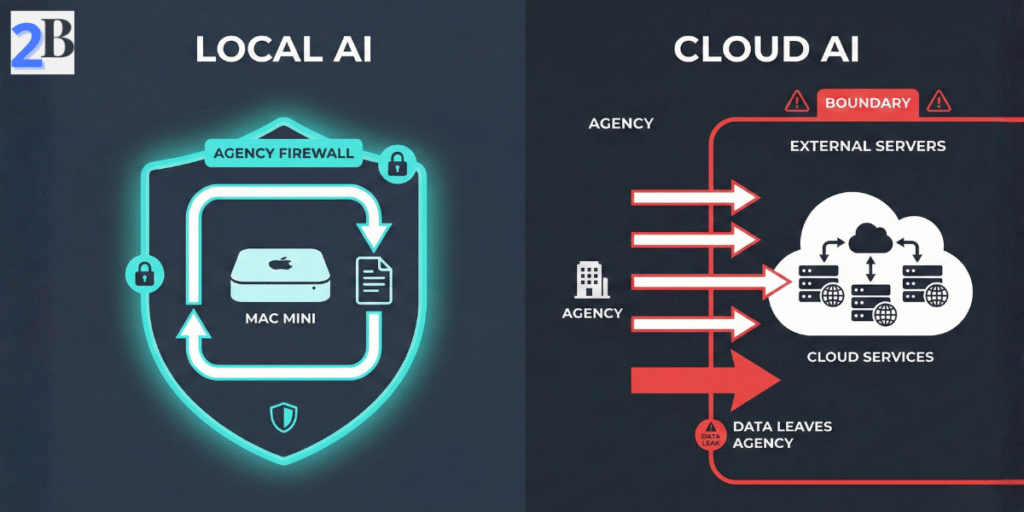
Operating a local LLM server like the Mac Mini M4 offers small agencies distinct, strategic benefits that directly impact privacy, operational predictability, and customization. Unlike cloud-based AI services, on-device inference mitigates recurring expenses and subscription risks while ensuring sensitive client data remains in-house, a crucial advantage given rising regulatory scrutiny.
Community feedback and market studies reveal top pain points with cloud AI: volatile usage costs and unclear data handling policies. Local LLMs solve these by enabling a fixed-cost setup with transparent resource allocation, affording agencies stable budgeting and enhanced client trust—key factors for sustained ROI.
However, agencies must weigh upfront hardware investment and maintenance against long-term cost amortization. Properly configured local LLMs optimize runtime efficiency and minimize latency, directly improving client deliverables’ responsiveness and customization options.
Storing and processing AI workloads locally eliminates the dependency on third-party servers, significantly reducing exposure to data breaches or unauthorized access. Agencies managing high-value or sensitive content benefit from retaining full control over input/output data, directly aligning with evolving compliance requirements like GDPR and CCPA.
Unlike cloud APIs, local LLMs do not transmit any data externally, allowing agencies to confidently handle proprietary or client-confidential information without exposing it over networks or to opaque service providers.
Local LLM servers empower agencies to customize models via fine-tuning or prompt engineering tailored to their clients’ unique vernacular and domain knowledge. This fine-grained control widens creative possibilities beyond the constraints of standardized cloud models.
The ability to train or adapt AI locally also future-proofs the agency’s intellectual property, enabling competitive differentiation as models evolve.
Shifting AI workloads on-device shifts cost structure from recurring, usage-based fees to capital expenditure plus occasional maintenance. For agencies, predictable monthly operational costs improve financial planning and present clear ROI thresholds.
| Cost Factor | Local LLM Server (Mac Mini M4) | Cloud AI Services |
|---|---|---|
| Initial Cost | One-time hardware + setup | None (pay-as-you-go) |
| Ongoing Cost | Electricity + occasional upgrades/support | Variable monthly fees based on usage |
| Cost Predictability | High – fixed capital and operational expenses | Low – susceptible to usage spikes and pricing changes |
| Scaling Expense | Incremental hardware additions required | Elastic scaling but cost uncertain |
Agencies with stable or growing AI demands can often realize cost savings within 12–18 months compared to cloud alternatives. The trade-off requires balancing upfront investment against operational certainty and control.
Next, we will explore the technical capabilities and architectural innovations in the Mac Mini M4 that underpin these advantages, preparing agencies to evaluate performance alongside these strategic benefits.
The technical architecture behind the Mac Mini M4 is pivotal in understanding its suitability as a local LLM server for small agencies. Apple’s integration of the CPU, GPU, and Neural Engine within a unified memory framework enables efficient model loading and inference that rivals more expensive setups. This section unpacks these elements to clarify how the M4 balances raw performance with memory bandwidth optimizations—key for handling LLM workloads while maximizing ROI.
Despite its compact form factor and affordable pricing, the Mac Mini M4 addresses common pain points such as RAM bottlenecks and latency in AI inference. Community benchmarks and user feedback confirm that understanding the synergy between Apple Silicon’s architectural elements is essential to setting realistic expectations, especially regarding model size limits and throughput.
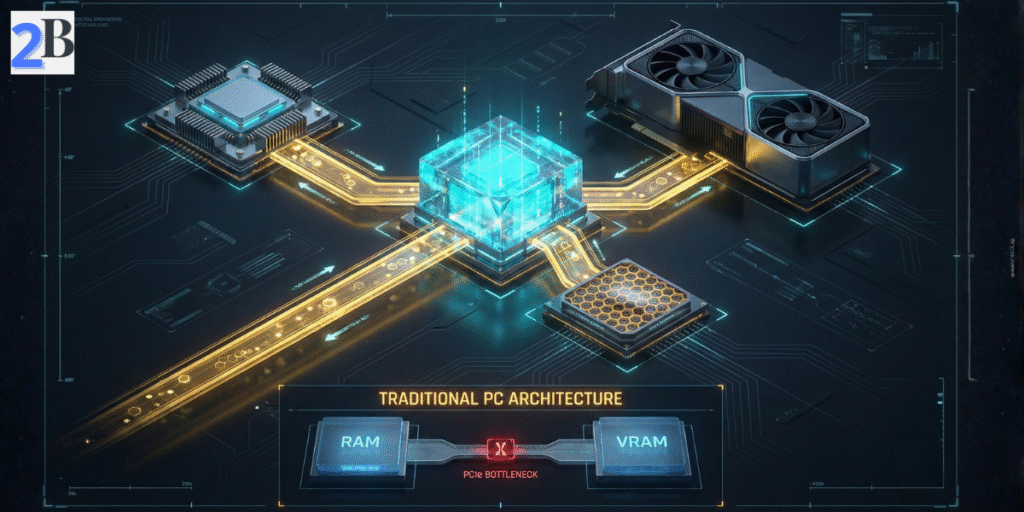
Unified Memory Architecture (UMA) consolidates RAM into a single pool shared by the CPU, GPU, and Neural Engine. This contrasts with traditional discrete GPU VRAM, which introduces latency and overhead through data copying, slowing down large-model operations. UMA reduces such overhead, enabling local LLMs to stream tokens more efficiently with fewer memory bottlenecks.
For small agencies, UMA means that while the base 16GB configuration is excellent for 8B models, scaling to 24GB or 32GB is what truly unlocks the ability to run medium-sized LLMs (13B–14B parameters) with professional stability. Relying on the baseline memory for larger models often forces SSD swap usage, which severely degrades real-world inference speed and increases latency, undermining the efficiency of the M4 architecture.
The M4 integrates an advanced 10-core CPU, a 10-core GPU, and a 16-core Neural Engine capable of 38 TOPS, orchestrating workload distribution to maximize AI efficiency. According to Apple’s official M4 specifications, this architecture is specifically designed to accelerate tensor computations and matrix multiplications essential for LLM token generation.
Unlike previous generations, this architecture features next-generation machine learning accelerators in the CPU, specifically designed to speed up the complex tensor computations and matrix multiplications essential for LLM token generation in agency-scale workflows.
This heterogeneous architecture allows the Mac Mini M4 to maintain competitive tokens-per-second throughput while keeping power consumption and heat production well-managed—critical for long inference sessions in an agency setting.
Tokens per second (TPS) remains the most actionable benchmark indicating how quickly an LLM can process input and generate output. Real-world community benchmarks indicate that the Mac Mini M4 achieves a sustained 18–22 TPS on 8B-parameter models (such as Llama 3.1) with 16GB unified memory using 4-bit quantization. This performance profile provides a highly responsive experience, outpacing human reading speed while maintaining peak power efficiency.
Quantization reduces model size and memory demands by representing weights in lower-precision formats. While the M4 supports modern quantization schemes natively, smaller RAM configurations restrict usable model sizes and increase swap activity, negatively affecting sustained inference performance on complex workloads.
| Config | Unified Memory | Max Model Size (Parameters) | Tokens/sec (8B Model, 4-bit) | Practical Use Case |
|---|---|---|---|---|
| Mac Mini M4 Standard | 16GB | Up to 8B (Stable) | ~18–22 | Single-user AI assistant, coding, and basic RAG pipelines |
| Mac Mini M4 Upgrade | 24GB | Up to 14B (Stable) | ~20–24 | Small agency content pipelines and multi-document analysis |
| Higher Unified Memory | 32GB | 14B – 20B+ (Quantized) | ~22–25 | Advanced reasoning agents, long context, and internal multi-user API |
Understanding these metrics guides agencies toward selecting the right Mac Mini M4 configuration aligned with targeted task complexity and throughput needs. Upgrading unified memory is a critical step for maximizing model capacity and reducing inference latency, directly influencing productivity and client ROI, especially when scaling toward more complex architectures like the ones we analyzed in our DeepSeek R1 local hardware and cost guide.
Accurate performance benchmarks are essential for small agencies evaluating the Mac Mini M4 local LLM server as their AI infrastructure backbone. Community-sourced token-per-second data reveal critical nuances in processing speed, particularly when comparing base and upgraded memory models and rival Macs like the M1 Max and M2 Pro. These insights inform realistic expectations about deployment scale and throughput.
This section contrasts performance across multiple LLaMA 3 variants (8B, 13B, 34B parameters) highlighting the practical impact of unified memory size (16GB versus 24GB) on local inference times. It also benchmarked cloud API latency and cost, framing local hardware investments within a cost-per-token and latency context.
The M4 Mac Mini demonstrates a range of real-world interactive throughput contingent on model size and RAM configuration. While internal MLX benchmarks can show high burst speeds, practical user-facing inference is governed by memory bandwidth. The 16GB baseline handles 8B models with excellent responsiveness (~18–22 tokens/sec), but encounters severe performance-killing swap penalties at larger 14B+ models. Upgrading to 24GB or 32GB unified memory is the definitive move to eliminate paging delays for professional reasoning workloads.
Comparative benchmarks indicate that while older “Pro” and “Max” chips still lead in raw token throughput—due to their massive memory bandwidth—the Mac Mini M4 offers the best performance-per-dollar ratio for small agencies. The M2 Pro Mac Mini (200 GB/s bandwidth) still outperforms the base M4 (120 GB/s) in high-throughput scenarios, but the M4’s improved Neural Engine and CPU ML accelerators close the gap for interactive tasks.
Cloud LLM APIs offer greater aggregate throughput at scale and eliminate local hardware management, but incur higher variable costs and network latency (~100–300ms round trip) that scale with query volume. Local inference on M4 Mac Mini reduces token response latency to ~30-50ms internally, important for interactive AI-powered client tools – a performance gap we explored extensively in our comparative DeepSeek R1 performance benchmarks analysis.
| Model & Config | Tokens per Second | Unified Memory | Relative Cost (USD) | Notes |
|---|---|---|---|---|
| LLaMA 3.1 8B (M4 Mac Mini) | ~18-22 | 16GB / 24GB | $599 / $799 | Best performance-per-dollar; 24GB prevents swap-death |
| LLaMA 3.1 13B (M2 Pro Mini) | ~30 | 16GB / 32GB | $1,299+ | Higher 200GB/s bandwidth accelerates token generation |
| LLaMA 3 13B (M1 Max Studio) | ~65 | 32GB/ 64GB | $1,999+ | Raw throughput leader but 3x the price of M4 entry. |
| Cloud API (Pro Models) | ~30-100 | N/A | $0.03–0.06 / 1k tokens | Higher latency and variable cost |
These benchmarks highlight the critical role of adequate unified memory in enabling viable local LLM deployment on the Mac Mini M4. For small agencies focused on balancing cost, latency, and model size, investing in the 24GB RAM option or considering higher-tier Mac models warrants careful cost-benefit analysis. The decision ultimately pivots on expected workload scale and required model complexity.
Deploying a Mac Mini M4 as a local LLM server offers tangible benefits for small agencies focused on AI-driven workflows, notably enhanced data privacy and reduced operational latency. However, realizing this potential requires thoughtful integration of software, hardware configuration, and ongoing maintenance practices aligned with agency-specific demands and scalability goals.
This section details the practical setup steps beyond raw hardware specs—addressing software stack selection, memory optimization, workflow integration, and essential monitoring strategies to ensure reliable and performant local AI services.
Small agencies must evaluate AI software ecosystems for local LLM serving based on stability, compatibility with Apple Silicon, and extensibility. Ollama and LM Studio have emerged as leading options with user-friendly interfaces and native support for M4 unified memory architectures, delivering efficient inference and model management.
Alternatively, custom Python environments (leveraging PyTorch or TensorFlow with Apple’s Metal framework) provide maximum flexibility but demand advanced setup and maintenance effort. The choice hinges on balancing ease of deployment against customization needs and future-proofing requirements.
Memory allocation proves critical due to M4’s unified memory architecture; agencies should provision no less than 16GB RAM for efficient medium-sized model operations, while 32GB or more is advisable for larger models or batch processing scenarios.
Integrating the LLM server into agency operations requires secure, scalable access methods. Multi-user configurations can be achieved by setting up dedicated user roles and SSH access controls.
Proactive maintenance is essential to sustain performance and avoid downtime. This involves regular software updates, log file audits, and hardware health checks to anticipate resource bottlenecks.
| Setup Aspect | Key Considerations | Recommended Actions |
|---|---|---|
| Software Stack | Compatibility with Apple Silicon, ease of use, customization | Choose Ollama or LM Studio for easy deployment; custom Python for flexibility |
| Memory & Storage | Unified memory minimum 16GB; SSD speed; disk capacity for models/data | Choose higher RAM configuration at purchase; use 1TB+ fast internal SSD or Thunderbolt NVMe storage |
| Workflow Integration | Multi-user access, API exposure, automation compatibility | Implement secure SSH; deploy APIs with FastAPI/Flask; automate updates |
| Maintenance & Monitoring | Uptime, performance metrics, hardware alerts | Enable system notifications; use monitoring tools; schedule maintenance tasks |
Equipped with this practical guide, agencies can confidently establish a Mac Mini M4-based local LLM server that balances performance, reliability, and operational integration. Next, we will analyze the detailed ROI implications to support informed investment decisions.
For small agencies evaluating the Mac Mini M4 as a local LLM server, quantifying the return on investment is critical. The decision hinges not just on upfront costs but on measurable savings and productivity gains compared to ongoing cloud API expenses. This section synthesizes community data and market benchmarks to map out precise cost-benefit metrics and break-even timelines tailored to typical agency workflows.
Aggregated user feedback highlights the strong financial advantage of local LLM inference through the M4 Mac Mini—especially when handling frequent or large-volume AI queries. Agencies achieving more than 1,000 API calls per month on cloud services can expect rapid cost offsets. However, memory configuration and operational scale remain decisive factors impacting exact ROI.
Assuming an agency processes 2,000 monthly LLM queries averaging 1,000 tokens each, cloud API costs—estimated at $0.03–$0.06 per thousand tokens depending on provider and model—total approximately $120 monthly (worst scenario). By contrast, a one-time $599 Mac Mini M4 investment with 16GB unified memory and local operation removes most of this recurring expense. Factoring in minimal maintenance and electricity costs (~$10/month), local hosting reduces predictable expenditures by over 90%.
TIP – Instead of cloud cost Token/1.000, also could be compared as SaaS cloud cost per user: example 5 to 6 monthly subscriptions = ~$120 monthly (in this example).
Besides direct cost savings, local LLMs on an M4 Mac Mini deliver a massive “Efficiency ROI” through zero-latency workflows. In an agency setting, waiting 10–20 seconds for a cloud response multiple times a day creates a cognitive drag. Community data suggests that local 18–22 t/s speeds can save an average of 5–8 hours per employee monthly in content iteration and RAG-based research cycles.
More importantly, local hosting allows agencies to build proprietary AI workflows that cloud providers often restrict or overcharge for. By reallocating human capital from routine tasks to high-value strategy, the Mac Mini M4 transforms from a hardware expense into a profit-generating asset within your first fiscal year.
Our break-even analysis reflects the 2026 market shift: 16GB is now the baseline standard for the M4 Mac Mini. For an agency currently spending $150–$250/month on a combination of API credits and Pro-tier seat licenses (ChatGPT/Claude Team), the $599 entry model pays for itself in under 6 months. The more powerful 32GB configuration, capable of running 14B reasoning models flawlessly, typically reaches break-even in 8–10 months, providing a significantly higher long-term ceiling for advanced client services.
| Metric | Base M4 Mac Mini (16GB RAM, $599) | Optimized M4 Mac Mini (32GB RAM, $999) | SaaS / Cloud Monthly Equivalent | Break-Even (Months) |
|---|---|---|---|---|
| Target Workload | 8B Models (Daily automation) | 14B+ Models (Reasoning/ RAG) | $150–$300 | 6–12 Conservative |
| Use Intensity | ~2,500 Queries/mo | ~4,000 Queries/mo | Varies by model | |
| Estimated Monthly Ops (Power/Maint) | ~$8 | ~$15 | Included in SaaS | |
| One-Time Purchase Cost | $599 | $999 | $0 (sunk Opex) |
Understanding this profit timeline allows agencies to shift AI from a volatile monthly expense to a fixed capital asset. By securing hardware that handles 2026’s reasoning standards (14B models), agencies ensure their ROI continues to grow even as AI complexity increases. The next step is the actual setup—turning this hardware into a functioning local AI hub.
This timeline accounts for depreciation and conservative operational costs, aligning with the financial patterns identified in our ROI and break-even study for DeepSeek R1.
In the rapidly shifting landscape of 2026, small agencies must balance immediate AI performance with a clear-eyed view of hardware longevity. The Mac Mini M4 serves as a robust foundation for local inference, but its long-term ROI depends on how well it can weather the next generation of “Reasoning Models” and the inevitable arrival of the M5 series. This section analyzes the M4’s staying power and tactical upgrade paths to ensure your local AI stack remains an asset, not technical debt.
The Mac Mini M4 excels in high-efficiency inference, particularly when configured with 24GB or 32GB of unified memory. As of 2026, 8B-parameter models have become the industry standard for daily agency tasks (copywriting, basic coding, email automation), and the M4 handles these with years of headroom. However, the emergence of 14B “Reasoning Models” (like DeepSeek R1 and Mistral Nemo) represents the practical ceiling for the base M4 silicon.
The anticipated M5 series is expected to deliver incremental improvements in processing efficiency and memory bandwidth, along with potential increases in unified memory capacity. However, concrete performance figures remain speculative, and current timelines suggest availability no earlier than late 2026. For most agencies, delaying adoption carries a significant opportunity cost.
To mitigate early obsolescence risks, agencies should implement incremental scaling strategies aligned to their budget and workload growth. Key tactics include starting with a higher-memory M4 machine, modularly adding networked Macs or leveraging efficient model distillation techniques to extend usable capacity.
| Platform | Unified Memory | Practical Tokens/sec (14B Model) | Recommended Agency Use-Case | Upgrade Viability |
|---|---|---|---|---|
| Mac Mini M4 (24GB/32GB) | 24GB – 32GB | ~8–12 | Mid-sized reasoning models (14B), high privacy, long-term daily ops. | Moderate — scale via clustering or future M4 Pro/M5 additions. |
| Future M5 (Projected) | 32GB+ (est.) | ~14–18 (est.) | Advanced reasoning & multi-agent orchestration. | High — pending bandwidth improvements (est. 150GB/s+). |
| Mac Mini M4 (16GB) | 16GB | ~5–7 (Swap heavy) | Entry-level AI, 8B models, cost-constrained prototyping. | Low — memory bottleneck limits use of next-gen reasoning models. |
Understanding these parameters enables agencies to tailor investments to realistic growth projections, preventing underpowered systems or premature replacements. The M4 serves as a robust interim platform but requires careful configuration and scaling plans for sustainable ROI.
The Mac Mini M4 local LLM server offers a compelling balance of price, unified memory efficiency, and Apple Silicon AI performance for small agencies aiming to deploy privacy-centric, cost-effective local AI solutions. However, its suitability depends heavily on anticipated model sizes and workload intensity, with key trade-offs around RAM capacity and raw inference speed.
Aggregated community benchmarks and user insights reveal that while the Mac Mini M4 excels with modest LLM workloads, configurations below 16GB unified memory constrain scalability and model complexity, impacting ROI for agencies expecting larger or multiple concurrent inference tasks.
This guide distills decision-driving criteria to assist agencies in evaluating potential fits and avoiding costly misinvestments.
| Criteria | Ideal Use Case (Standard & Optimized) | Limitations & Bottlenecks |
|---|---|---|
| Model Scale | 8B models (Llama 3.2) run flawlessly; 14B models (DeepSeek R1) are viable on 24GB+ configs. | Performance degrades sharply on models above 14B; requires aggressive quantization. |
| Memory Config | 24GB – 32GB is the professional “sweet spot” for reasoning and multi-user tasks. | The 16GB base variant limits multitasking and causes “swap-lag” on reasoning models. |
| Inference Speed | 18–22 tokens/sec (8B models), exceeding human reading speed for interactive use. | Outpaced by M4 Pro / Max bandwidth (273GB/s+) for batch processing or large-scale serving. |
| Budget Scope | High-ROI entry point for agencies ($599 – $999 range) focused on daily automation. | Scaling beyond 14B models requires moving to Mac Studio or clustering multiple units. |
The Mac Mini M4 local LLM server is a precision tool, not a universal solution. It should be avoided by agencies with the following requirements to prevent operational bottlenecks:
The Mac Mini M4 stands out as a strategically viable local LLM server for small agencies in 2026, offering a rare trifecta of cost-efficiency, impressive per-user performance, and total data sovereignty. Its Unified Memory Architecture is the “secret sauce” that allows this compact box to outperform traditional PCs in AI inference tasks, provided you avoid the trap of under-provisioning RAM.
Our analysis confirms that for agencies processing 2,000+ monthly queries, the Mac Mini M4 is not an expense, but a high-yield asset. By configuring the unit with at least 24GB of unified memory, you secure a server capable of running Llama 3.1 (8B) and DeepSeek R1 (14B) with professional-grade responsiveness and zero recurring fees.
Local LLM servers empower agencies to maintain strict data privacy controls, critical for client confidentiality and regulatory compliance. The elimination of recurring cloud costs and reduced latency also translate into quantifiable savings and operational efficiency.
Deploying a Mac Mini M4 local LLM server requires deliberate planning around memory configuration, thermal management, and software ecosystem compatibility. Leveraging community-tested frameworks such as Ollama, LM Studio, or the Apple MLX Framework can accelerate setup and optimize model inference performance for agency-scale workloads.
| Key Factor | Recommended Spec/Action | Agency Benefit |
|---|---|---|
| Unified Memory | ≥24GB | Enables 14B reasoning models; prevents system-wide lag |
| Performance Benchmark | ~18–22 tokens/sec (8B Models) | Interactive, real-time AI assistance for professional use |
| Security | On-premises deployment | Data sovereignty and compliance assurance |
| Cost Efficiency | $599 Base + RAM Upgrade | Can Replaces high-cost SaaS seat licenses with a one-time asset. |
| Maintenance | Regular software updates + cooling checks | Stable, consistent AI availability uptime |
Deploying a Mac Mini M4 local LLM server requires deliberate planning around memory configuration, thermal management, and software ecosystem compatibility. Leveraging community-tested frameworks such as Ollama or Apple MLX Framework can accelerate setup and optimize model inference performance.
With these insights, agencies can confidently configure the Mac Mini M4 as a local LLM server, balancing raw performance with long-term operational control. Now, let’s look at the financial “bottom line” and see how quickly this hardware investment pays for itself.