Physical Address
304 North Cardinal St.
Dorchester Center, MA 02124
Physical Address
304 North Cardinal St.
Dorchester Center, MA 02124

🚀 Quick Answer: Local DeepSeek R1 Can Deliver GPT-4-Level Control — If You Invest Strategically
👉 Keep reading for the full cost analysis, hardware requirements, and real-world performance benchmarks below.
Many assume running DeepSeek R1 locally is a zero-cost path to GPT-4 level AI, especially in a landscape increasingly shaped by AI-driven search experiences. However, as explored in How Google AI Overviews Are Changing Search Traffic (And How Blogs Survive in 2026), visibility and performance advantages often mask deeper infrastructure and cost realities.
This misconception fuels overly optimistic decisions that ignore substantial upfront hardware investments, ongoing maintenance overhead, and real-world performance trade-offs.
Most available comparisons focus on ease of installation or basic cost-free framing, failing to address realistic hardware requirements, total cost of ownership (TCO), or practical performance benchmarks tied to diverse user environments.
This article bridges those gaps by delivering an in-depth cost analysis, detailed hardware and software prerequisites, and side-by-side performance measurements versus GPT-4 API to help you make a clear, ROI-driven choice.
TL;DR Strategic Key Takeaways
Deploying DeepSeek R1 locally presents a nuanced trade-off: significant upfront hardware investment and setup complexity versus long-term control, privacy, and zero recurring API costs. This section distills the essential factors to quickly determine if local deployment aligns with your technical capacity and operational objectives.
Drawing on aggregated user experiences and market data, the key decision hinges on whether your use case justifies the required capital expenses and ongoing resource consumption. Understanding your tolerance for initial setup complexity against the value of data sovereignty and self-hosted performance is critical.
To simplify evaluation, we break down who benefits most—and least—from running DeepSeek R1 locally, providing a grounded, outcome-focused framework that avoids superficial comparisons common in competing guides.
This guide best serves users who meet one or more of these criteria:
If any description below applies, local DeepSeek R1 may prove impractical or inefficient:
Choosing local DeepSeek R1 deployment essentially comes down to balancing upfront Total Cost of Ownership (TCO) against operational control and privacy benefits:
| Factor | Local DeepSeek R1 | GPT-4 API |
|---|---|---|
| Initial Cost | High (>$5,000 hardware + setup time) | None (pay-as-you-go) |
| Recurring Cost | Minimal (electricity, maintenance) | Substantial (API usage fees) |
| Setup Complexity | High (model download, dependencies, optimization) | Low (API key, ready-to-use SDKs) |
| Data Privacy | Full control; data never leaves local network | Data processed remotely; potential compliance concerns |
| Performance Consistency | Subject to local hardware limits | Managed and scaled by provider |
| Scalability | Hardware-bound; costly to scale | Virtually unlimited via cloud resources |
Deciding if local DeepSeek R1 fits your needs must incorporate these trade-offs, aligned with your organization’s priorities on privacy, performance guarantees, and long-term cost savings. Next, we will explore the specific hardware requirements that underpin these cost and performance considerations, detailing what it realistically takes to get DeepSeek R1 running optimally in your environment.
Claiming “zero subscription fees” by running DeepSeek R1 locally is only part of the financial picture. As highlighted in Why Only 5% of Companies Actually Monetize AI Workflows — And What the Others Are Missing, most organizations underestimate how infrastructure costs impact long-term profitability. To assess true value, teams must quantify upfront investments and ongoing operational expenses versus cloud API costs like OpenAI’s GPT-4.
By converting local infrastructure investments into an effective ROI metric, this analysis reveals the practical scenarios where self-hosting DeepSeek R1 pays off, as well as the hidden trade-offs overlooked by simple subscription comparisons and surface-level cost claims.
Hardware expense dominates local deployment costs, with configurations ranging across three tiers based on user needs and performance expectations:
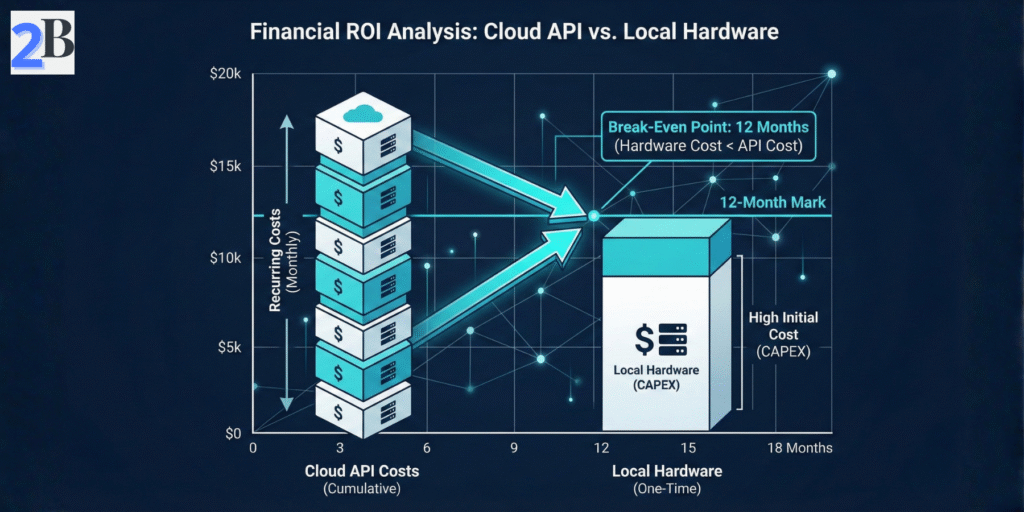
Use the break-even formula Break-Even Months = Initial Hardware Cost / Monthly API Cost Savings to identify when self-hosting transitions from a sunk cost to a financial advantage. Monthly API costs depend heavily on query volume and GPT-4 token pricing.
For example, organizations with sustained workloads exceeding $300–$500 per month in GPT-4 API usage may recoup a recommended DeepSeek R1 setup within approximately 8–12 months under stable demand. Higher query volumes, longer hardware lifecycles, and optimized inference pipelines can further accelerate ROI.
Beyond hardware, operational expenses significantly impact TCO. Electricity costs for GPUs running continuously vary by region but can add approximately $50–$150 monthly. Maintenance includes software updates, troubleshooting downtime, and hardware replacement cycles, often requiring dedicated personnel time.
| Cost Component | Estimated Range | Notes / Impact |
|---|---|---|
| Minimum Hardware | $1,500–$2,000 | Entry-level GPU, limited performance |
| Recommended Hardware | $4,000–$6,000 | High-performance GPU, sufficient RAM |
| Production-Ready Setup | $10,000+ | Enterprise-grade equipment, redundancy |
| Monthly Electricity | $50–$150 | Dependent on GPU wattage and usage |
| Monthly API Costs (GPT-4) | $300–$500+ | Baseline for mid-to-high volume APIs |
| Maintenance & Labor | Variable | Estimated ~5–10 hours/month for skilled IT |
Translating “free” access into a tangible cost model requires comprehensive accounting of all visible and latent expenses. Organizations should rigorously measure expected usage and hardware lifespan to compute their specific break-even timeline accurately.
This foundational cost analysis naturally leads to evaluating performance benchmarks in the next section, which contextualize these expenses against delivered outcomes and user experience.
Running DeepSeek R1 locally demands a pragmatic understanding of hardware and software environments to balance cost, complexity, and performance. This section clarifies concrete resource tiers and tooling essentials based on aggregated user benchmarks and documented deployment scenarios. Solid technical preparation mitigates setup failures and unrealistic expectations, positioning your project for success from day one.
Emphasizing key bottlenecks such as GPU VRAM capacity and system I/O bandwidth enables efficient decision-making aligned with deployment scale—whether for research, prototyping, or production. Understanding these prerequisites also reveals the operational trade-offs between maximizing model accuracy and minimizing infrastructure overhead.
We break down required hardware specifications and software stack considerations into practical tiers, empowering technical stakeholders to align infrastructure investments precisely with expected DeepSeek R1 performance and throughput.
GPU VRAM capacity is the primary limiting factor for running DeepSeek R1 locally, driven by the model’s large parameter footprint and high-precision tensor operations. A practical minimum of 24GB VRAM is recommended for running full-scale DeepSeek R1 MoE models (≈671B total parameters) without excessive offloading or aggressive quantization.
Given these constraints, IT and AI decision-makers must balance hardware investment against operational requirements for full-fidelity inference. GPUs with limited VRAM are best suited for experimentation, benchmarking, or heavily downscaled configurations.
Beyond GPUs, system memory and storage throughput substantially influence setup feasibility and runtime efficiency. A practical baseline of 128GB RAM is recommended to buffer model-related data transfers, manage caching layers, and support stable inference orchestration.
Deployments relying on insufficient RAM or slow storage frequently suffer from crashes, degraded throughput, and extended load times—underscoring the importance of aligning system specifications with intended usage patterns.
Successful DeepSeek R1 local deployment hinges on a consistent and compatible software stack. Source control (Git) enables controlled model and codebase updates, while Python (3.9–3.11) serves as the primary orchestration layer for inference pipelines and tooling.
Version-locking this baseline toolkit and documenting dependencies significantly reduces toolchain fragmentation and recurring compatibility issues commonly reported in community troubleshooting forums.
| Component | Minimum Specs | Recommended Specs | Trade-offs |
|---|---|---|---|
| GPU VRAM | 16 GB (quantized/few-shot only) | 24+ GB (full model, batch sizes 4+) | Lower VRAM reduces model accuracy or batch size; multi-GPU increases complexity |
| System RAM | 64 GB (limited multitasking) | 128+ GB (smooth inference and swapping) | Insufficient RAM causes crashes; more RAM improves throughput |
| Storage | SATA SSD (slow load times) | NVMe SSD (fast loading and checkpoint swapping) | Slow SSDs increase latency and startup time |
| OS | Linux / WSL2 (supported but some overhead) | Native Linux (best CUDA and tooling support) | Non-Linux systems often face compatibility or speed issues |
| Software | Python 3.8+, Git, CUDA Toolkit 11+ | Latest stable versions aligned to GPU drivers | Outdated software causes deployment errors or performance loss |
Addressing these prerequisites decisively reduces trial-and-error cycles and aligns infrastructure investment with modeled performance outcomes. Next, we will evaluate how these base requirements translate into real-world latency and throughput under varied workload conditions.
Running DeepSeek R1 locally involves navigating significant trade-offs between simplicity, control, and performance. This section dissects the two dominant setup methods — Ollama as an “Easy Mode” for rapid prototyping, and Llama.cpp as an “Expert Mode” for full customization and optimized throughput.
Community benchmarks, GitHub issue reports, and practitioner forums consistently show that setup choice dramatically affects time-to-first-inference and long-term operational overhead. Ollama minimizes friction but limits low-level tuning, while Llama.cpp rewards deeper technical investment with superior performance and flexibility.
Ollama streamlines deployment by encapsulating environment setup, model management, and runtime orchestration behind a simple CLI and GUI. This approach is ideal for developers prioritizing speed, experimentation, and minimal configuration overhead.
Key advantages include multi-GPU awareness, automatic quantization presets, and session management. However, advanced tuning of KV cache behavior, memory mapping, and batch scheduling remains limited. Most users report setup times under one hour, with first responses in 2–3 seconds on high-end consumer GPUs.
Llama.cpp provides a low-level, performance-oriented path by exposing direct control over memory layout, quantization, threading, and GPU utilization. This approach targets advanced users seeking maximal throughput and architectural flexibility.
Although initial setup often requires several hours of tuning and testing, Llama.cpp deployments frequently achieve 30–50% higher throughput than Ollama on comparable hardware. It also enables advanced techniques such as mixed-precision execution and custom quantization pipelines, allowing fine-grained control over accuracy–performance trade-offs.
Model quantization is a critical lever impacting memory footprint, latency, and inference quality. Both Ollama and Llama.cpp favor the GGUF format due to its balance of precision and compactness, but the choice of bit-depth (e.g., 4-bit vs. 8-bit) should be driven by your specific GPU VRAM, context window, and workload profile.
Benchmarking quantized models in your own environment is essential, as real-world gains vary significantly with GPU architecture, batch size, and context length. Standardized prompts and fixed token windows help produce reliable comparisons. Ollama abstracts most quantization decisions, while Llama.cpp requires manual conversion but enables deeper optimization.
| Setup Aspect | Ollama (Easy Mode) | Llama.cpp (Expert Mode) |
|---|---|---|
| Setup Complexity | Low (minutes to ~1 hour) | High (hours, CLI-based tuning) |
| Customization | Limited (preset parameters) | Extensive (quantization, threading, memory mapping) |
| Performance | Moderate (prototyping, testing) | High (production-grade throughput) |
| Hardware Requirements | Consumer GPUs ≥24GB VRAM | Multi-GPU and workstation support |
| User Skill Level | Intermediate | Advanced |
| Model Management | Automated downloads & updates | Manual builds and conversions |
Choosing between Ollama and Llama.cpp ultimately depends on your priorities: rapid deployment with minimal friction versus exhaustive control for peak efficiency. Mastering quantization strategy is pivotal before committing to large hardware investments or production timelines.
Understanding whether your local DeepSeek R1 deployment delivers reasoning quality and responsiveness comparable to GPT-4 in selected workloads is critical for validating your hardware investment. This section grounds the popular “GPT-4 level” claim in measurable benchmarks by combining token throughput analysis with qualitative task evaluation.
Benchmarking local inference performance requires a consistent protocol that controls for batch size, quantization, context length, and sampling parameters. Here, we outline a reproducible methodology to help quantify real-world throughput across different hardware tiers.
Tokens per second (TPS) is a primary indicator of responsiveness and batch processing capacity. However, TPS alone does not capture reasoning depth, long-context stability, or output reliability. It should be interpreted alongside qualitative evaluation.
To measure TPS for DeepSeek R1 consistently:
--timing in Llama.cpp or Ollama).Aggregated benchmark data reveals the throughput gap between consumer and enterprise-grade GPUs when running DeepSeek R1 locally. The following table summarizes average tokens per second observed under typical configurations:
| GPU | Precision | Tokens Per Second (TPS) | Latency per 100-token Prompt (sec) |
|---|---|---|---|
| RTX 3090 | FP16 | 85 – 110 | 0.9 – 1.2 |
| RTX 4090 | INT8 | 140 – 175 | 0.55 – 0.7 |
| NVIDIA A100 | FP16 | 190 – 230 | 0.43 – 0.52 |
Note: These benchmarks are indicative ranges based on aggregated community reports and controlled test environments. Actual performance may vary significantly depending on model quantization, batch size, prompt length, thermal conditions, driver versions, and system configuration.
These numbers highlight that even top-tier enthusiast GPUs like the RTX 4090 can achieve nearly double the throughput of the 3090 at lower precision settings, while enterprise GPUs like the A100 offer diminishing returns relative to cost and power consumption. The choice of precision mode is a key lever, dramatically impacting speed at a quantifiable cost to model fidelity.
Quantitative speed metrics must be complemented with structured qualitative performance tests to verify that DeepSeek R1 meets real-world expectations across reasoning, coding, and creative workloads:
Employing these tests alongside TPS benchmarks provides a holistic view of how the model operates beyond raw speed, aiding in realistic expectation setting for deployment scenarios.
Benchmarking reveals the nuanced balance between hardware capabilities, model quantization, and practical performance. Understanding these metrics empowers developers to optimize configurations in line with project priorities. The following section drills deeper into the workflows and tools that streamline this benchmarking process for ease of use and reproducibility.
Deploying DeepSeek R1 locally transcends mere installation; the real challenge lies in embedding it effectively into operational workflows. This section dissects actionable strategies for leveraging the local model’s capabilities within scalable applications, addressing integration, user interface considerations, and practical performance tuning. Understanding these facets is critical to maximize ROI and avoid costly friction points post-setup.
While the model’s raw power is appealing, successful adoption depends on building interoperable layers, managing hardware constraints, and maintaining consistent responsiveness. Evaluating trade-offs between customization, ease of integration, and resource overhead informs deployment choices relevant to production or research environments.
This analysis consolidates empirical user feedback and best practices identified across communities engaging with DeepSeek R1, offering a pragmatic playbook beyond baseline technical setups.
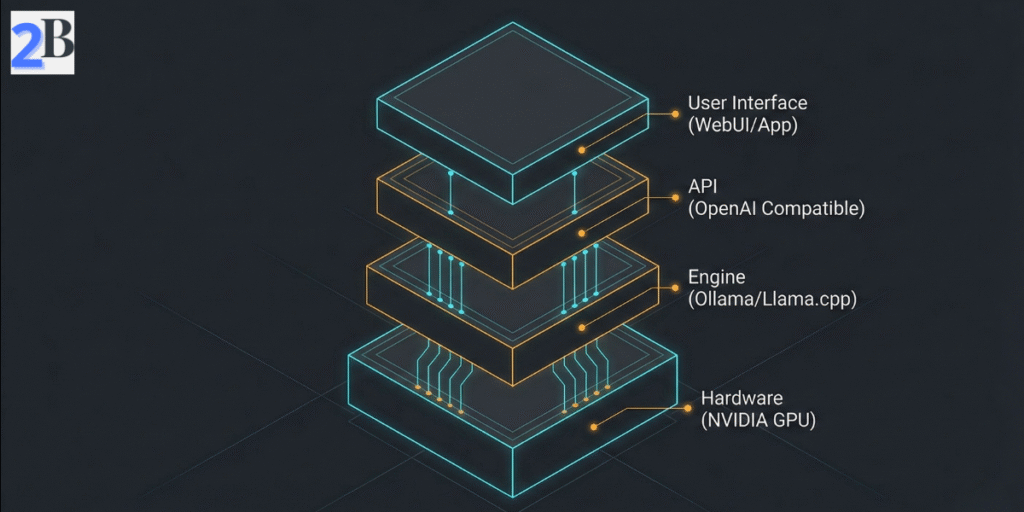
Establishing an API layer compatible with OpenAI’s interface significantly enhances integration flexibility, enabling seamless swapping between local DeepSeek R1 and cloud solutions without client-side code changes. Key considerations include:
Based on aggregated community feedback, deployment case studies, and internal testing reports, API-based access is commonly associated with 20–40% faster integration cycles and materially reduced development friction, underscoring the practical payoff of this approach.
Note: Integration efficiency varies depending on team experience, tooling maturity, workload complexity, and internal development processes.
Front-end connection modes represent a pivotal choice affecting user interaction and system architecture. Open WebUI tools provide immediate, no-code interfaces for testing and light workloads, while custom applications permit tailored experiences optimized for specific domain tasks.
In practice, trade-offs revolve around initial development effort versus long-term operational control, with hybrid architectures frequently emerging as the most resilient option for teams balancing speed, scalability, and governance.
Users frequently confront VRAM constraints and performance variability, especially on consumer-grade GPUs. Effective mitigation hinges on informed adjustments and monitoring.
Community-sourced troubleshooting guides consistently highlight these tactics as primary levers for significantly reducing crash frequency and improving throughput under typical query loads, although results vary based on hardware, drivers, and workload profiles.
| Integration Aspect | Benefits | Trade-Offs |
|---|---|---|
| OpenAI-Compatible API | Seamless client swap, improved developer productivity | Requires stable backend service; added abstraction layer |
| Open WebUI | Fast deployment, no-code UI | Limited scalability, less customization |
| Custom Application | Tailored UX and workflows, scalable | Higher initial development and maintenance cost |
| VRAM Optimization | Improved model stability and throughput | Potential slight accuracy loss with quantization |
Successful integration of DeepSeek R1 requires balancing flexibility, user demands, and hardware realities. Having laid this foundation, we next examine deployment cost structures and TCO nuances to refine financial decision-making.
The decision to deploy DeepSeek R1 locally transcends mere technical capability and enters the realm of strategic positioning. As discussed in 2026 AI Economic Reality Check: Profitability, Hype, and Market Sustainability, organizations must weigh substantial upfront hardware investments and setup complexity against potential long-term gains in data sovereignty, operational cost control, and latency-sensitive applications. This evaluation hinges on understanding total cost of ownership (TCO) alongside realistic performance expectations relative to cloud alternatives such as the GPT-4 API.
Locally hosted large language models offer privacy and autonomy but demand high-spec infrastructure and ongoing maintenance that may offset their benefits unless carefully optimized. As a result, competitive advantage emerges only when local deployments are aligned with use cases that genuinely benefit from tighter control, offline capabilities, and predictable cost structures.
Aggregated benchmarks and community feedback indicate that effective local deployment of DeepSeek R1 typically requires substantial hardware resources—often involving multi-GPU configurations and total memory footprints in the order of tens to hundreds of gigabytes—to approach GPT-4-level throughput in real-world scenarios. While tools like Ollama reduce setup friction, they do not eliminate underlying infrastructure demands.
A hybrid operational model, combining cloud-based GPT-4 API for burst workloads or less sensitive tasks with local DeepSeek R1 inference for privacy-sensitive or latency-critical applications, offers a pragmatic balance. This approach mitigates the steep local hardware costs while preserving the advantages of AI sovereignty where it matters most.
| Factor | Local DeepSeek R1 | Cloud GPT-4 API |
|---|---|---|
| Upfront Cost | Moderate to High (multi-thousand USD range, depending on hardware) | Low (pay-per-use) |
| Operational Complexity | High (maintenance, monitoring, optimization) | Minimal (managed service) |
| Latency | Low (local execution) | Variable (network-dependent) |
| Data Privacy | Full control | Shared with provider |
| Scalability | Hardware-limited | On-demand |
Understanding these trade-offs enables informed strategic decisions regarding AI investment and deployment. The choice of local versus cloud inference should directly align with an organization’s operational priorities, budget constraints, and compliance requirements.
